
The Uncountable portal is a controlled way for people outside your team to send you data, and a structured way for your team to receive it. Customers, partners, and suppliers need a simple path to submit a request or a result, and your team needs that submission to arrive as data they can actually work with. The portal handles both sides of that exchange: what your partner sees on the outside, and what your team gets on the inside.
Most external data still arrives the long way. A supplier emails a certificate of analysis (CoA), the document confirming that a material lot meets its specification. A contract lab sends results as a PDF. A customer attaches a spreadsheet with a sample request buried in the third tab. Every one of those has to be opened, read, and re-entered by someone before the work can move. A supplier portal removes that step by making the submission itself the record.
What partners and suppliers see in the Portal
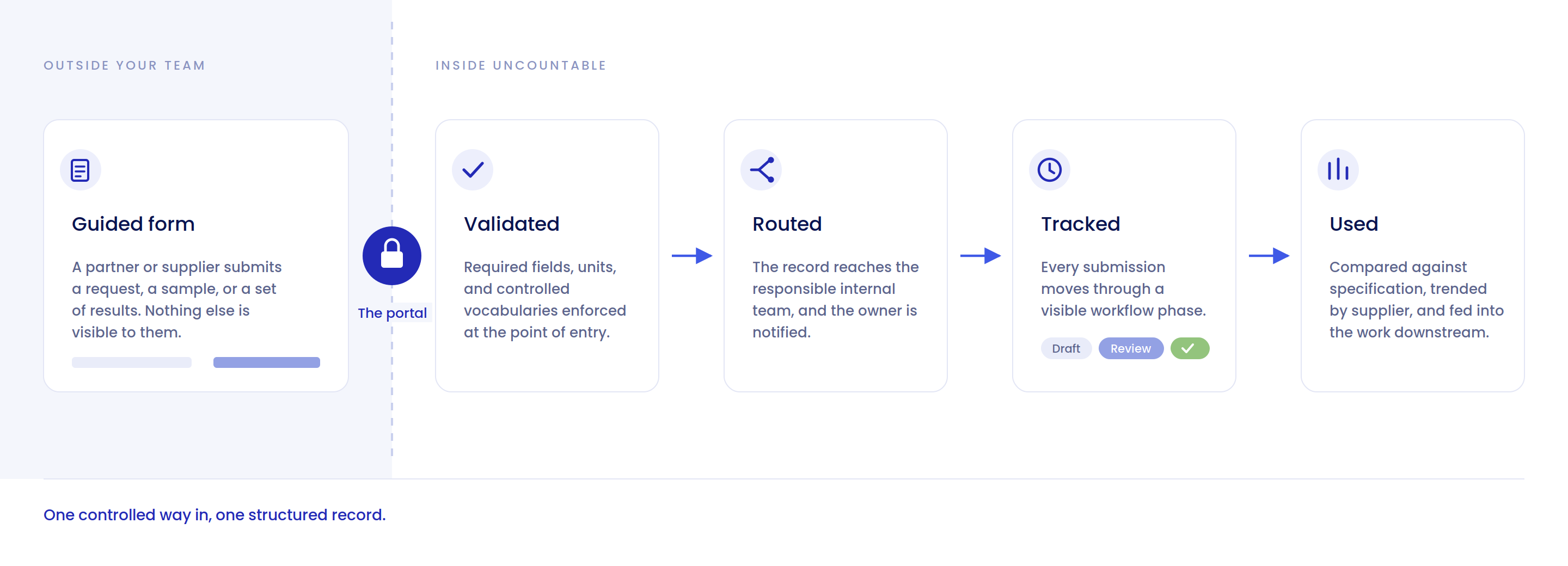
On the outside, the portal is simple by design, and it shows an external user only what they need. A partner or supplier opens a guided form to submit a request, a sample, or a set of results, without access to your formulations, your pipeline, or anyone else's data. It is a clear, limited way to send you exactly what you asked for, and nothing more.
That simplicity is what makes external adoption realistic. Partner-facing systems usually fail for the same reason: the partner has no incentive to learn one. The form is short, the fields are the ones you asked for, and the submission takes a few minutes.
.png)
What your team receives: structured, routed records
On the inside, each submission arrives as structured data, routed to the right team and ready to work with. There is no re-keying from an email attachment and no copying values out of a PDF. Because the submission lands in the same system as the rest of your data, it can be searched, compared against existing records, and acted on right away.
The difference shows up in what you can ask. Once external results are structured records rather than files, questions like "how have this supplier's incoming lots trended over the last six months" or "which of these test requests are past their desired-by date" become queries instead of projects.
.png)
What happens after a submission arrives
Intake is the beginning of the workflow, not the end of it. A submission that lands cleanly and then sits in a queue has not saved anyone much time.
Each submission enters as a record with a workflow phase attached, moving from draft through review to complete, so the status of external work is visible without anyone chasing an email thread. The record routes to the internal team responsible for it, and the people who need to act on it are notified rather than expected to check.
From there the submission behaves like any other record in the platform. Results can be compared against the specification they were meant to meet. Submissions from the same supplier can be trended together. A request that started as an external form can feed the QC decision, the batch record, or the development study that depends on it, without a second data entry step.
Why validation at the point of entry matters
There is a difference between catching bad data and preventing it.
A guided form can require the fields you need, constrain units, hold values to expected ranges, and offer controlled vocabularies instead of free text. A supplier cannot submit a result in the wrong unit, leave the lot number blank, or invent a new name for a test that already exists in your system.
That matters more than it first appears. Data cleaned up after the fact is data that was already wrong somewhere: in a report, in a comparison, in a decision someone made before the correction landed. Validating at the moment of entry means the version of record is correct from the start, and no one downstream inherits a problem they cannot see.
Why does structured intake matter?
Structured intake matters because the alternative quietly costs time and introduces errors. When outside data arrives as email attachments or PDFs, someone has to re-enter it by hand before anyone can use it, and every manual transcription is a chance to introduce a mistake. Routing that data straight into structured records removes the re-keying step and keeps external submissions in the same place, and the same format, as the work they feed.
It also creates a record of the exchange itself. Who submitted what, when they submitted it, and what changed afterward are all captured as part of the submission rather than reconstructed from inboxes later. For supplier qualification and deviation investigations, that history is often the thing you need most and have least of.
.png)
Workflows that fit the Portal
The portal fits any workflow where people outside your team need a controlled way to send data in. In practice, a few patterns come up repeatedly:
- Supplier certificates of analysis. Incoming material documentation arrives as structured results tied to the lot, rather than as PDFs filed in a folder.
- External testing requests. Work sent to a contract lab goes out as a tracked request, and results come back attached to it.
- Contract manufacturer results. Production and QC data from an external site lands in the same system as the internal development data it came from, which keeps the handoff from R&D to manufacturing traceable.
- Customer sample submissions. A customer sends a sample and the context that goes with it, in one guided form.
Forms are configured to match the workflow behind them, so the fields an external user fills in map to the fields your team already uses. Different partner types can be given different forms, which means a supplier submitting a CoA and a customer submitting a sample are not forced through the same generic request.
How Portal access is controlled
Access is gated, and each external user sees only their own path in. A supplier does not see another supplier's submissions, and no external user has visibility into your formulations, your pipeline, or your internal records.
Submissions carry an audit trail of who submitted what and when, which is the same record quality your internal work is held to. For teams evaluating external access in a regulated environment, Uncountable's security documentation covers the underlying controls in detail.
Why not just email, a shared drive, or an API?
For a partner you exchange data with constantly, a direct integration is often the right answer, and the portal is not a substitute for one.
The portal exists for everyone else: the partners who submit occasionally, the suppliers too small to build an integration, the contract labs you work with on a handful of projects a year. Those relationships usually default to email because building anything else is not worth it. The portal makes the low-volume, long-tail exchange structured without asking either side to build or maintain a connection.
Compared with a shared drive or a monitored inbox, the difference is that nothing has to be interpreted after the fact. The data arrives in the shape you asked for.
See it in action
One controlled way in for the people outside your team, one structured record for the people inside it. To see the Uncountable portal in action, request a demo.
.png)
.png)
.png)
