Uncountable is now available as a Plugin inside ChatGPT for US-hosted customers

Table of Contents
5
min read

Structured data is only useful if the people who need it can get to it. Uncountable's MCP server, which connects ChatGPT directly to a company's Uncountable data, is now also available as a Plugin inside ChatGPT, so teams that live in either assistant can reach the same record.

How to Turn It On: In ChatGPT, go to Plugins and search for Uncountable (US). Full setup steps, including the workspace-level configuration your admin will need to complete, can be found here.
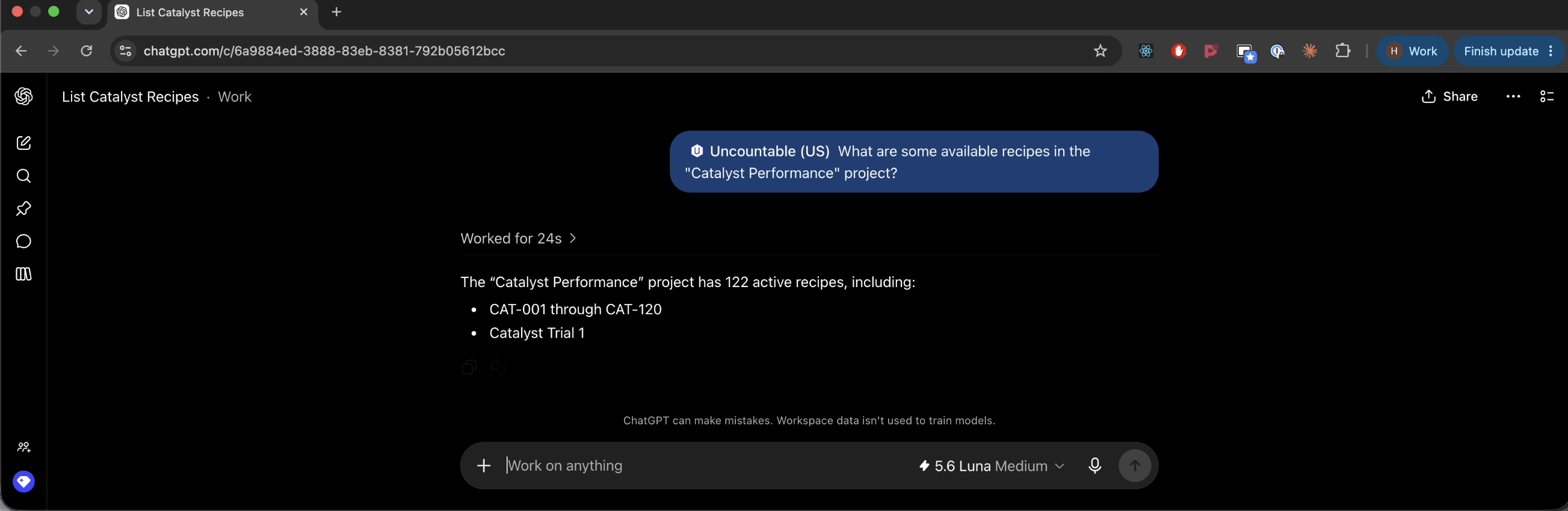
Uncountable in ChatGPT, retrieving live project and recipe data on request.

Nothing about where the work happens changes. Formulation, quality, and product lifecycle data are still designed, tested, and governed inside Uncountable, on a structured record with the audit trail and permissions that regulated teams need. What's different is reach: someone working in ChatGPT can now query that record, pull batch traceability, search by property or process condition, and write an observation back with attribution, without switching tools to do it.

Uncountable's data is structured well enough to be useful from any MCP connector. Learn more about the Uncountable Plugin with a customized demo.

FAQs

What is the Uncountable Plugin for ChatGPT?

The Uncountable Plugin connects ChatGPT to a company’s Uncountable environment through the Model Context Protocol (MCP). It lets authorized users retrieve and work with structured formulation, quality, project, and product lifecycle data through natural-language prompts in ChatGPT. Uncountable remains the system of record for the underlying data.

Who can use the Uncountable Plugin in ChatGPT?

The Plugin is available to US-hosted Uncountable customers. Workspace administrators must first configure the connection and publish it for their ChatGPT workspace. Individual users then authenticate with their own Uncountable credentials before using the connector.

Does using ChatGPT move Uncountable data into ChatGPT?

No. The purpose of the Plugin is to make existing Uncountable data reachable from ChatGPT. Formulation, quality, and PLM records continue to be structured, maintained, and governed in Uncountable rather than being recreated in a separate system.

What can users do with the Plugin?

Depending on the tools and permissions enabled by an administrator, users can use ChatGPT to query Uncountable data and perform approved actions through natural language. Common use cases include finding project or recipe information, searching records by property or process condition, reviewing traceability details, and capturing observations with user attribution. Administrators can also configure MCP access as read-only or disable individual tools.

How are permissions and access controlled?

Access is governed by the user’s Uncountable authentication and the connector configuration set by the workspace administrator. Uncountable administrators can manage connector availability, control which MCP tools are exposed, and configure read-only access where appropriate.