Uncountable on iOS and Android

Scan it once.
It's on the record.

Scan a container, pull up the material, record what actually went in. Uncountable runs on iOS and Android against the same platform your team already uses.

One instance, every device
The app opens the instance your organization already runs. No second system to stand up, no mobile data to reconcile.
The same login
Same SSO, SAML and SCIM. Same roles and permissions. No mobile accounts, no second directory.
On by default
Nothing to enable per deployment. If someone has access to the platform, they have it on their phone.

Deployed by 175+ enterprise product development teams

Dow company logo with white text on a red diamond-shaped background
Syngenta company logo with a green leaf above the letter g.
Beiersdorf
Clariant
Braskem company logo with stylized yellow and blue arrow design.
Total Energies Logo
St Jude Logo
Lubrizol company wordmark logo with blue curved line underneath the text.
Dow company logo with white text on a red diamond-shaped background
Syngenta company logo with a green leaf above the letter g.
Beiersdorf
Clariant
Mondelez International logo with the tagline Snacking Made Right in purple text.
Total Energies Logo
St Jude Logo
Lubrizol company wordmark logo with blue curved line underneath the text.

Deployed by Enterprise R&D and Innovation Teams

One Platform

Point the camera. The record opens.

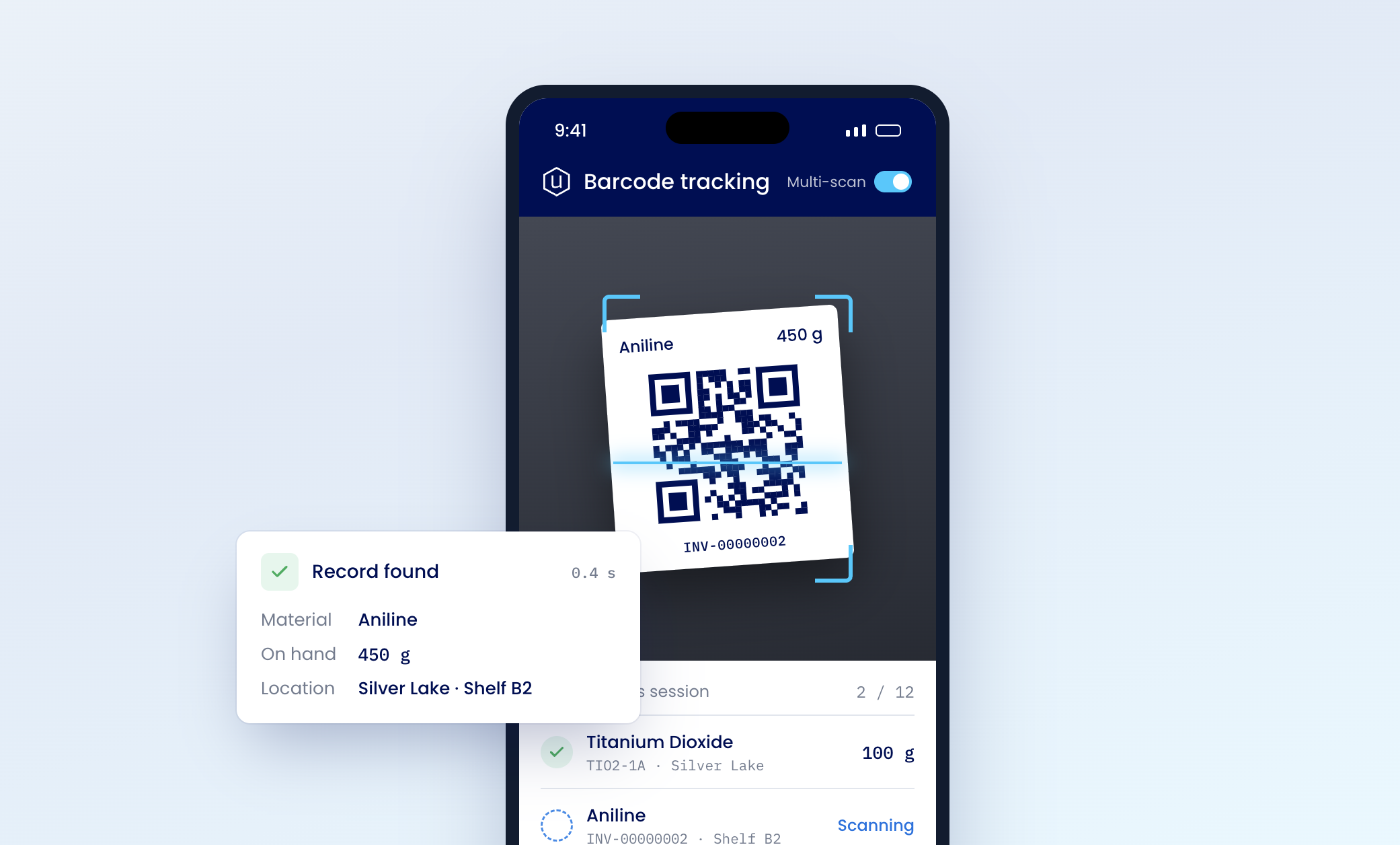
Scan the barcode or QR code on a drum, a vial or a shelf. The material, lot or recipe comes up — nobody types a code into a search box.
Multi-scan mode
Work through a shelf container by container, without leaving the scanner.
Keep your handheld scanners
Every scan field also takes a typed code or a wedge scanner.
Labels built in
The code on the container and the record it opens come from the same system, end to end.
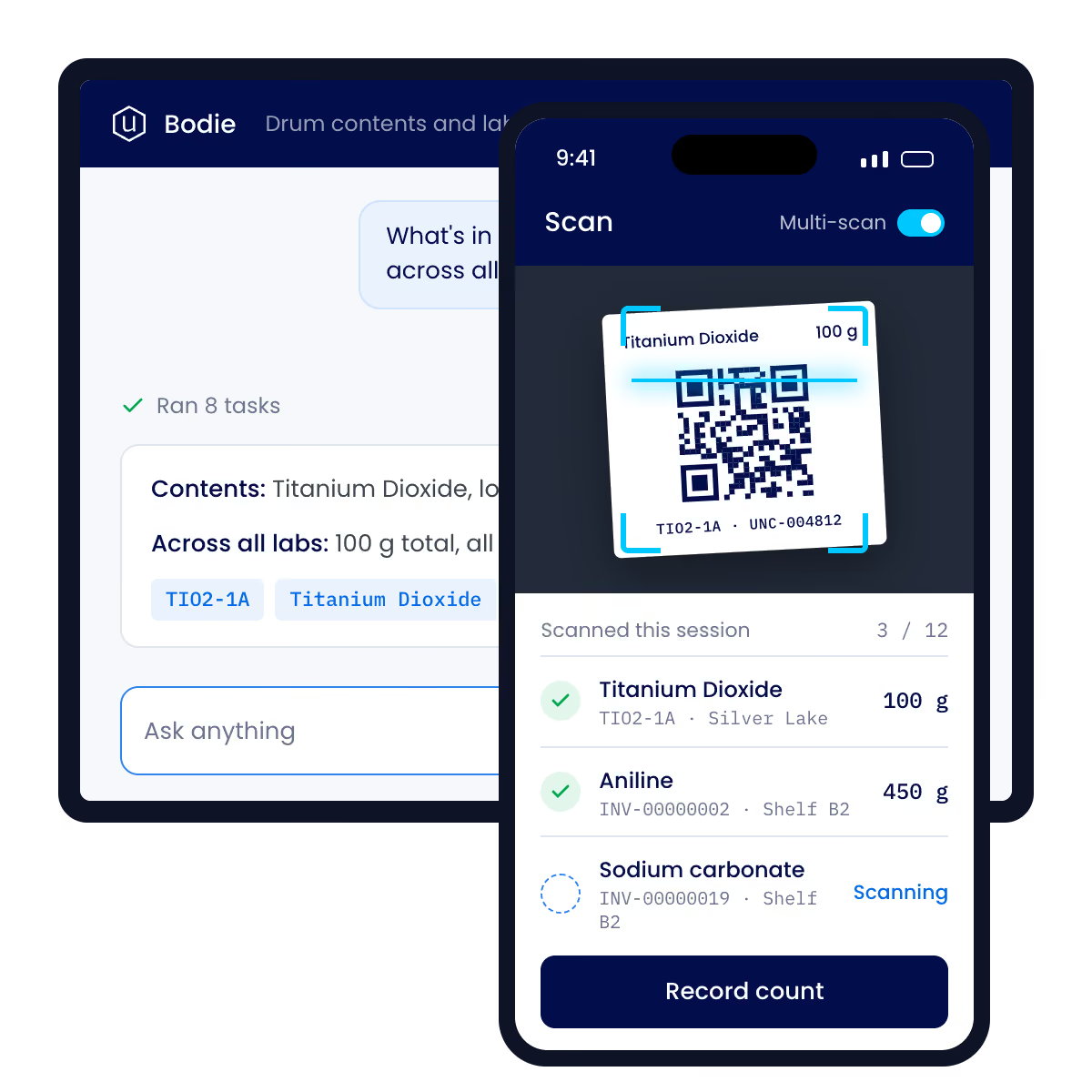
Mobile app interface showing chemical inventory scanning with a QR code for Titanium Dioxide labeled 100 g being scanned, a list of scanned items including Titanium Dioxide, Aniline, and Sodium carbonate with their quantities and shelf locations, and an option to record the count.
In the Lab

Four jobs a phone does better.

Record it once, at the bench.

Add Actuals logs the quantities that really went into a batch. Scan each container as it's used, enter the number, move to the next step. The batch record is written while the work happens — not reconstructed from a glove or a clipboard hours later.
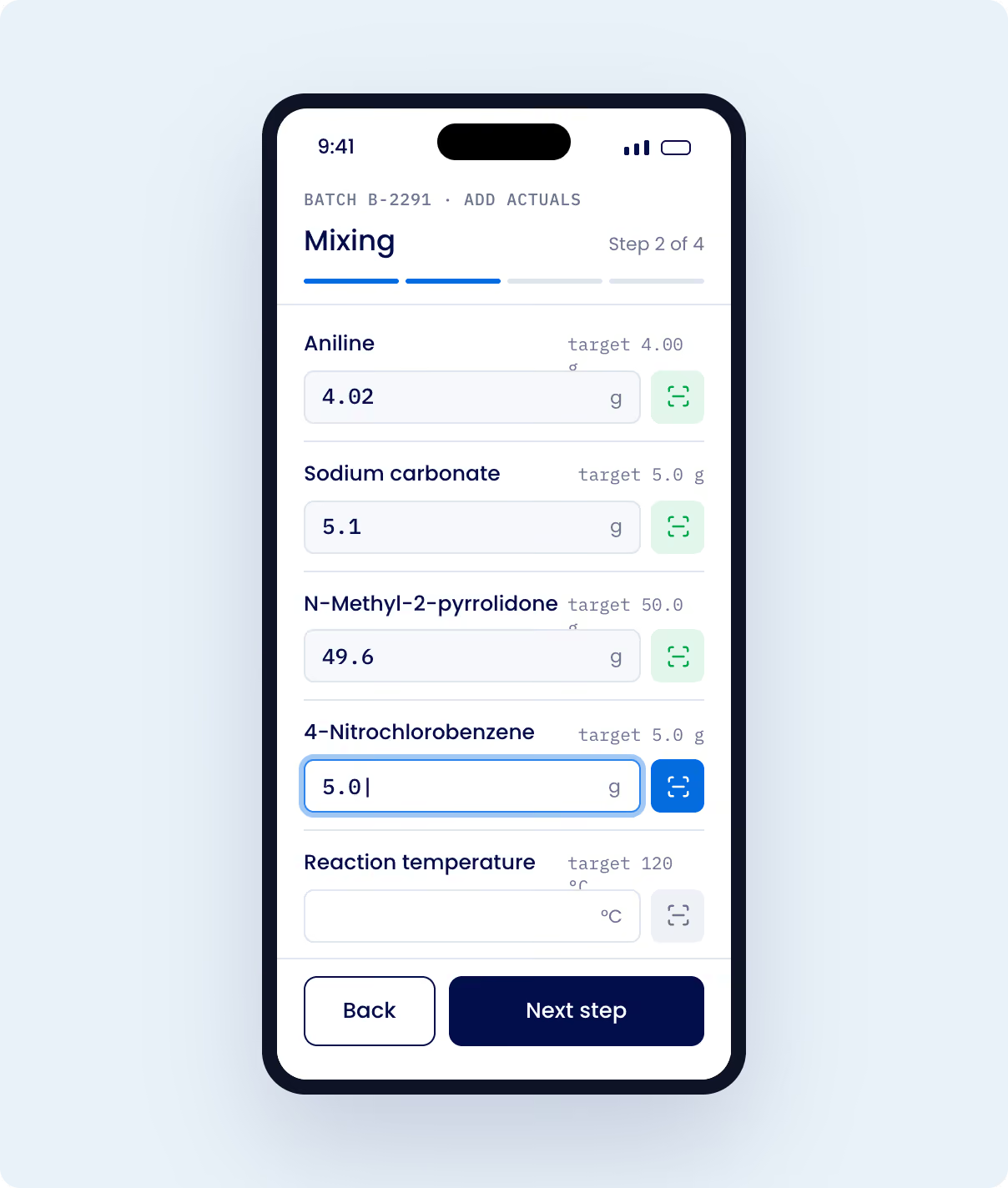
Scan each container as it goes in — or type the code if the label is damaged
IDENTITY
SSO, SAML, SCIM
ACCESS
Role-based, any device
21 CFR Part 11, Annex 11
SECURITY
SOC 2 Type II, ISO 27001
ENCRYPTION
AES-256 at rest, TLS in transit
HOSTING
US, EU or Japan
Mobile app interface showing step 2 of 4 in a mixing process for a chemical batch B-2291 with fields for Aniline, Sodium carbonate, N-Methyl-2-pyrrolidone, 4-Nitrochlorobenzene weights in grams, and reaction temperature in Celsius. The values entered are 4.02 g Aniline, 5.1 g Sodium carbonate, 49.6 g N-Methyl-2-pyrrolidone, 5.0 g 4-Nitrochlorobenzene, with a blank field for reaction temperature. Buttons labeled Back and Next step are at the bottom.

Scan the screen. Shoot. It's on the record.

Open the record on your desktop and scan the code it shows. Your phone pairs to that session, and photos land on the record while you're still standing over the sample. No install, no second login, no emailing yourself a picture.
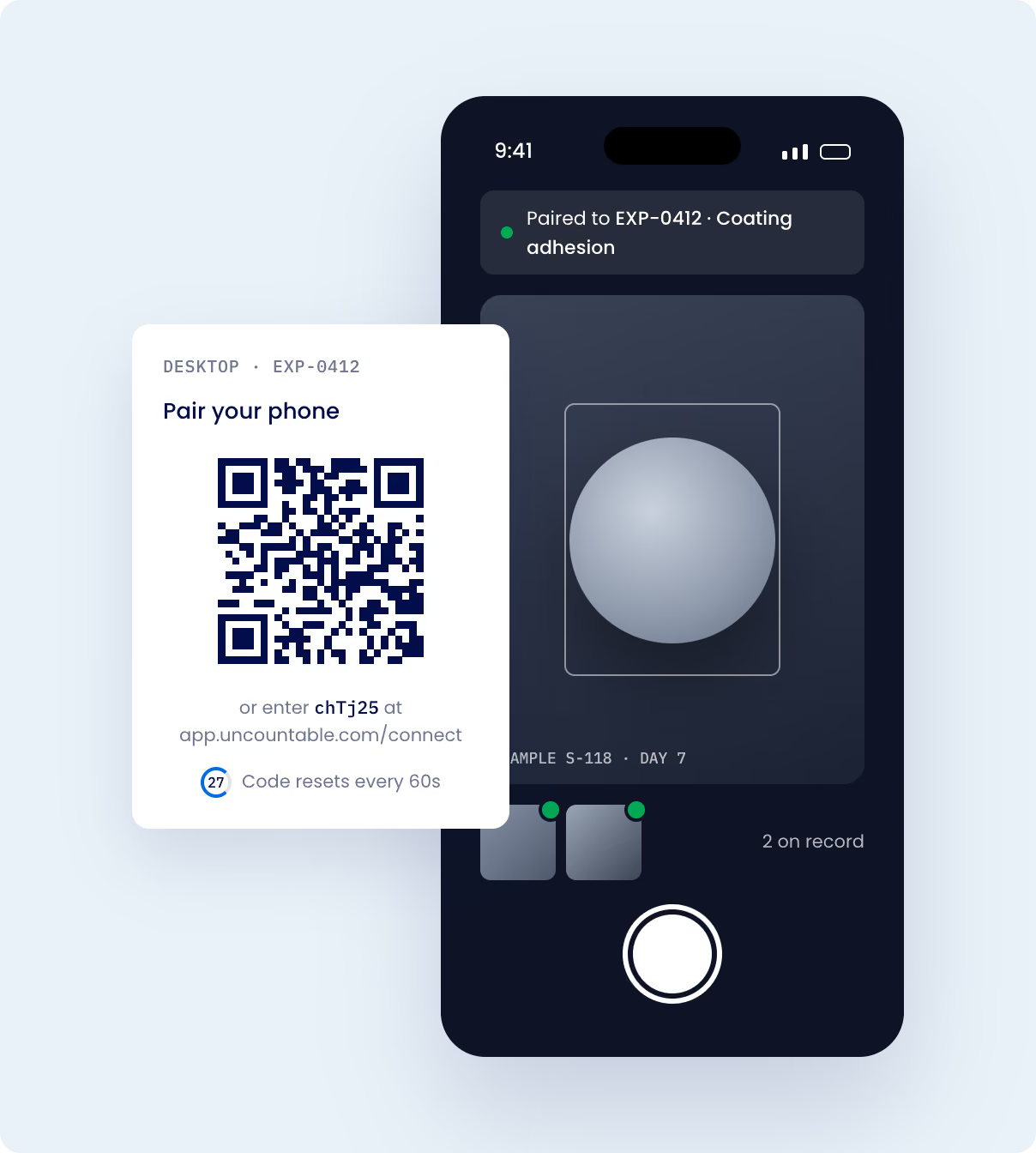
Visual evidence on a quality event or test result
Condition of incoming material against a supplier record
Anything a written description would flatten
Smartphone screen showing an app interface with a central gray sphere, paired to EXP-0412 with coating adhesion status; next to the phone, a white box displays a QR code for pairing the phone or entering code chTj25 at app.uncountable.com/connect, with a note that the code resets every 60 seconds.

Same platform. Same controls.

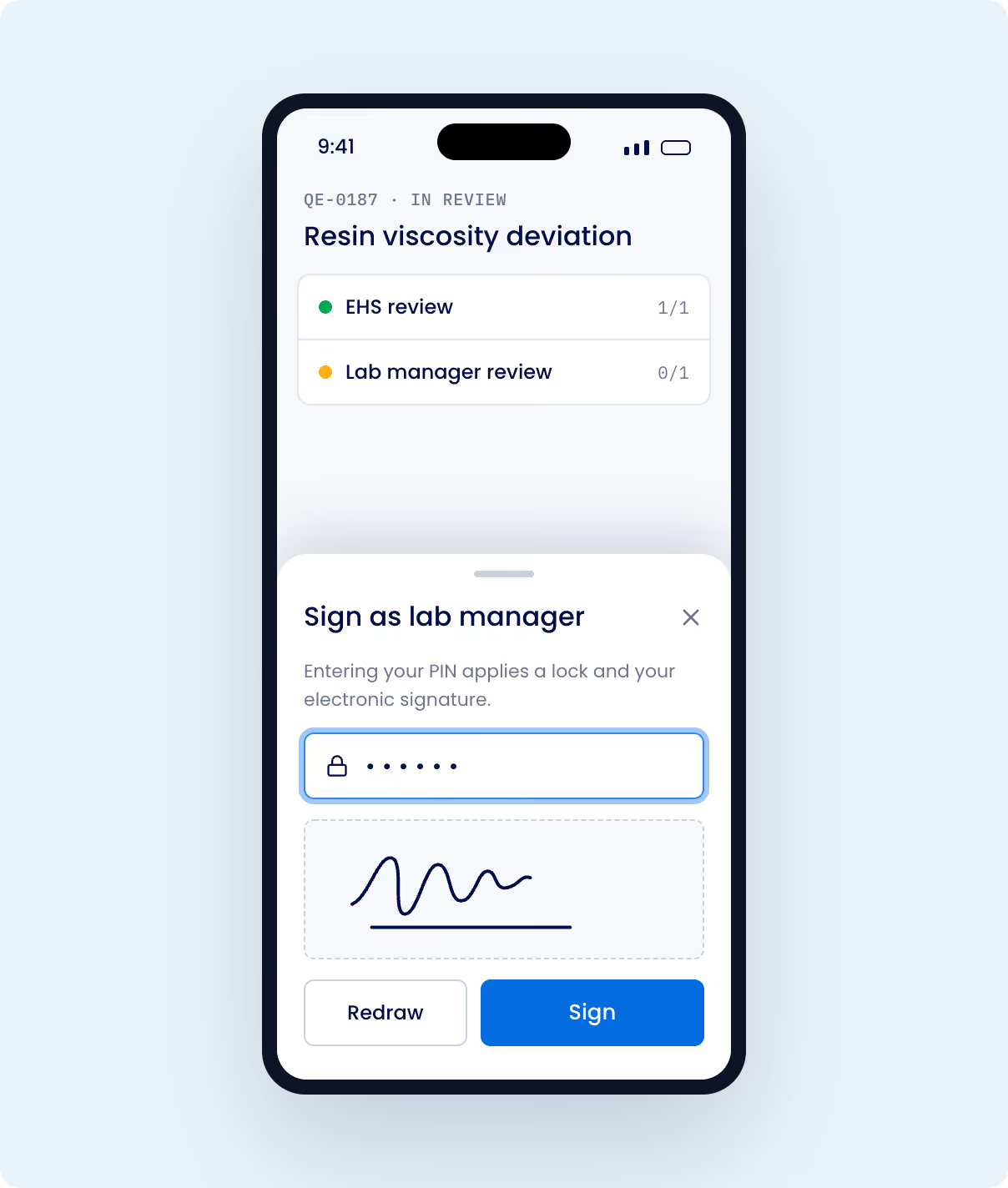
Mobile carries the same roles, permissions and identity setup as every other way in. Remove someone in your identity provider on a Friday afternoon and they're removed everywhere, phone included. E-signatures use the desktop signing path, and every action writes to the same audit trail.
Scan each container as it goes in — or type the code if the label is damaged
One step on screen at a time, not a recipe grid shrunk onto a phone
Keeps the details you'll need in six months: which lot, what changed, by how much
Mobile screen showing a resin viscosity deviation review app with sections for EHS review marked complete and lab manager review pending; a sign-in interface for lab manager includes a PIN input, electronic signature area with a squiggly signature, and buttons to redraw or sign.

A camera that works the first time.

The app grants the camera up front, so scanning starts on the first tap — no permission prompt mid-count, no re-asking after a cleared cache or a shift change. Uncountable sits on the home screen and opens straight to your instance. On iOS, setup is a single scan.

No address bar, no tab strip. One-handed at a shelf, that's the difference between reading a quantity and squinting at it.
IOS
16.4 and later
ANDROID
7.0 and later
DEVICES
Phone and tablet, one build
NAVIGATION
Native back, forward, reload
Mobile app interface screen showing step 2 of 4 in a chemical mixing process with input fields for weights of chemicals: Aniline 4.02g, Sodium carbonate 5.1g, N-Methyl-2-pyrrolidone 49.6g, 4-Nitrochlorobenzene 5.01g, and a blank field for reaction temperature target 120°C. Buttons labeled 'Back' and 'Next step' are at the bottom.
At a glance

Built for mobile. Used in the lab.

Five functions built for the moments lab work moves — counting at the shelf, charging at the bench, photographing what's in front of you.

Table listing functions of a mobile app with their description and where they live: 1. Barcode and QR scanning using device camera for single or multi-scan used in Inventory, Recipes, Search. 2. Add Actuals captures quantity step-by-step at the bench used in Recipes and Experiments. 3. Scan to open a recipe directly from label in Recipes. 4. Phone as camera to add photos to any open record on desktop. 5. Same login with SSO, SAML, SCIM as configured platform-wide.
Use Cases

Where a device beats a desk

Lookup
What is this drum?

Scan the label and the material comes up, with its lot and the formulations that use it. No one walks back to a workstation to find out.

count
Working through a shelf

Multi-scan mode moves container to container, so a count is recorded where the stock is instead of on a clipboard that gets typed up later.

bench
Charging a batch

Add Actuals records the quantities that genuinely went in, each container scanned as it is used. The batch record is written while the work is happening.

evidence
Something needs a photo

Scan the code on the open record and the photos land on it as you shoot. No cable, no camera roll, no emailing a picture to yourself.

existing hardware
You already own scanners

Every scanner in the platform accepts a typed code or a handheld wedge scanner. A phone joins the workflow where it helps and stays out of the way where it doesn't.

Offsite
A plant visit or a supplier site

The same login, roles, and permissions apply wherever the app opens. Nothing extra to provision and no second account to manage.
The phone writes to the same record, not a copy of it.

There is no mobile database to sync and no export to reconcile. What gets scanned at the bench is on the record the lab, quality, and product teams already work from.

FAQs

Does Uncountable have a mobile app for iOS and Android?

Yes. Uncountable has native iOS and Android apps that run on phones and tablets, supporting iOS 16.4 and later and Android 7.0 and later. The app opens your organization's existing instance using the same login, SSO, and SAML as the desktop, so there is no separate mobile account and nothing to enable per deployment.

Can you scan barcodes and QR codes with a phone in Uncountable?

Yes. Uncountable uses the device camera to scan barcodes and QR codes, and opens the material, lot, or recipe behind the code. Scanning is available from quick search, from tables of records, from inventory lookup, and in a multi-scan mode for working through several containers. Every scanner also accepts a typed code or a handheld wedge scanner.

Does Uncountable work offline on a phone?

No. Uncountable requires a live connection, on mobile and on the desktop. There is no offline capture or background sync today, so scanning, lookup, and quantity capture all need network access at the time of use.

The platform your lab runs on, where the work happens.

See scanning, bench capture, and the connected record in a walkthrough built around your materials.