Every sampling point on the map, every result on the record
Environmental monitoring for regulated R&D and manufacturing, built on the same data model as the lab. Map areas and sampling points on your site plan, schedule sampling and capture evidence from a phone at the point itself.
Deployed by 175+ enterprise product development teams






Deployed by Enterprise R&D and Innovation Teams


Five parts.
One monitoring program.
Monitoring runs from the physical location to the evidence collected there. Every part is a platform record, open to workflows, permissions, dashboards, API and Bodie.
Monitoring locations
Areas and site maps
Sampling points
Sampling plans
Mobile capture
The swab calendar lives in a spreadsheet
Most monitoring programs run on a floor plan PDF, a schedule spreadsheet and photos on someone's phone. Points drift from the map, the calendar is rebuilt by hand each quarter and results arrive disconnected from the location they describe. Uncountable keeps the location, the schedule and the evidence on one record.
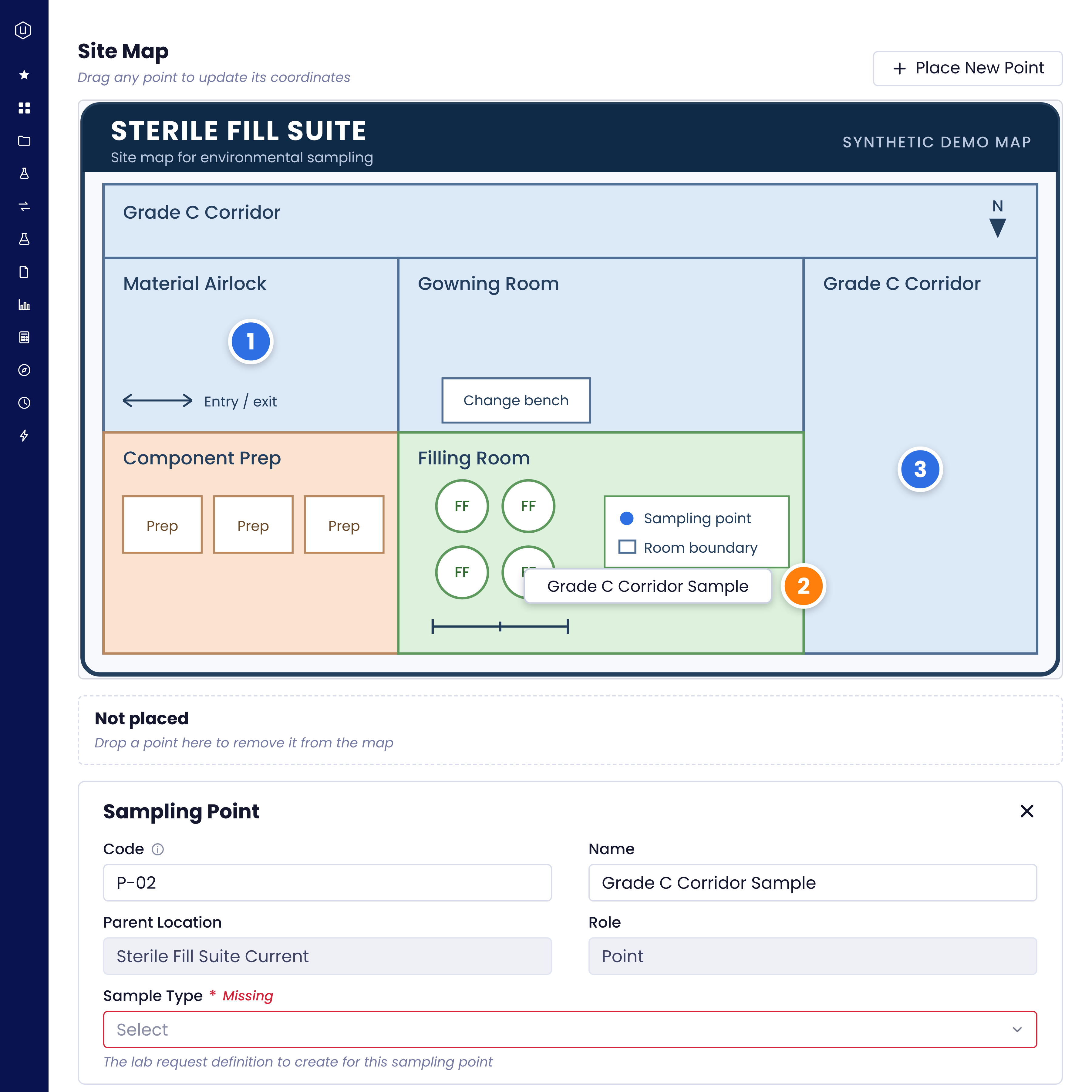
- Sampling points sit on the area’s own site map. Drag a point and its coordinates update.
- Each area carries its cleanroom classification, such as EU GMP Grade C.
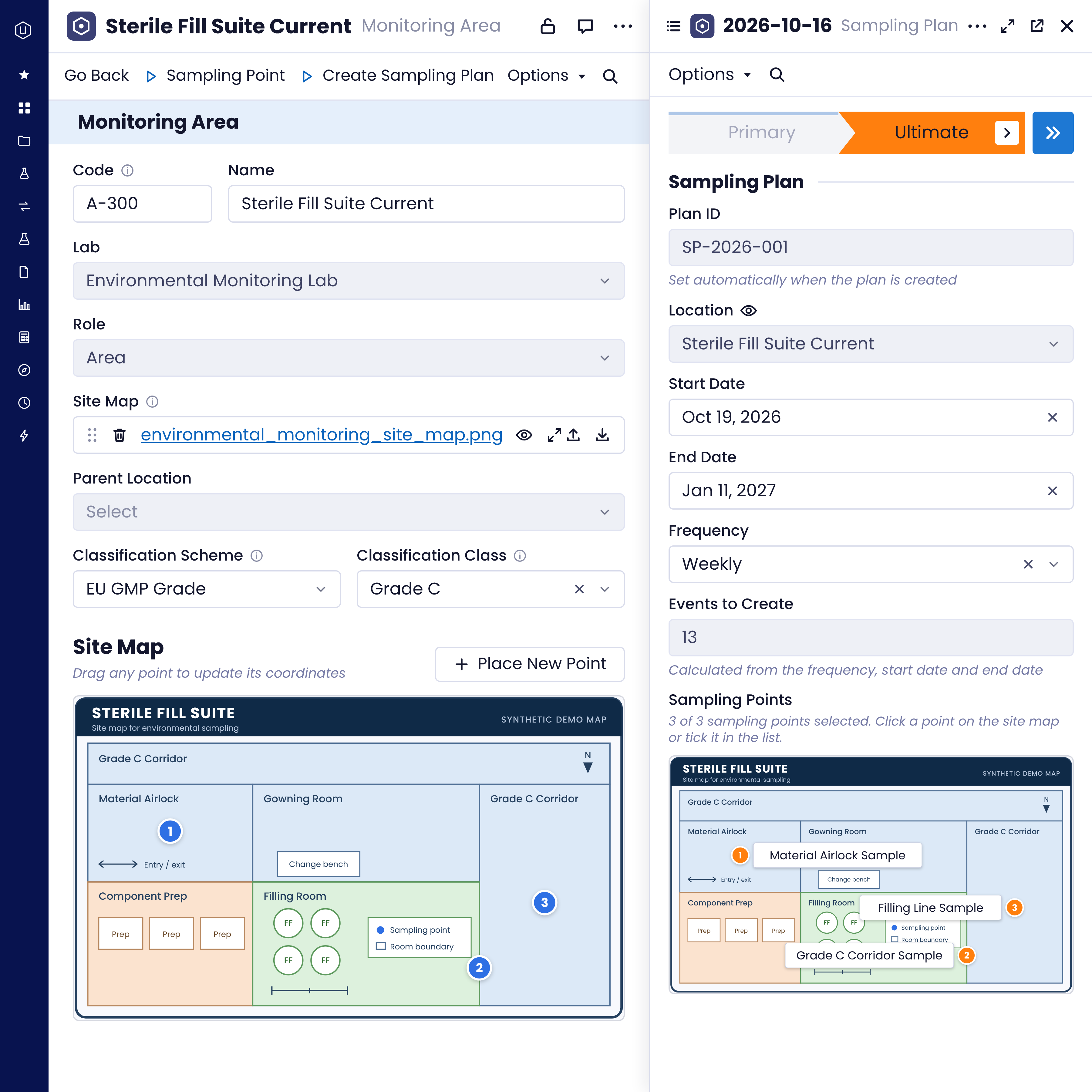
- Set a frequency and date range once, and the sampling plan creates every event for you.
- Each point’s sample type raises the right lab request, so results land on the location they describe.
- Photos and files captured on a phone attach to the same record.

One record.
From the floor to the result.
Each sampling point lives on the map of the area it belongs to, carries the lab request it generates and holds the evidence captured there. Nothing to reconcile at the end of the week.
The old way
The Uncountable way
Open a monitoring program
Every area and sampling point in your program, with its position, schedule and evidence held on one record.
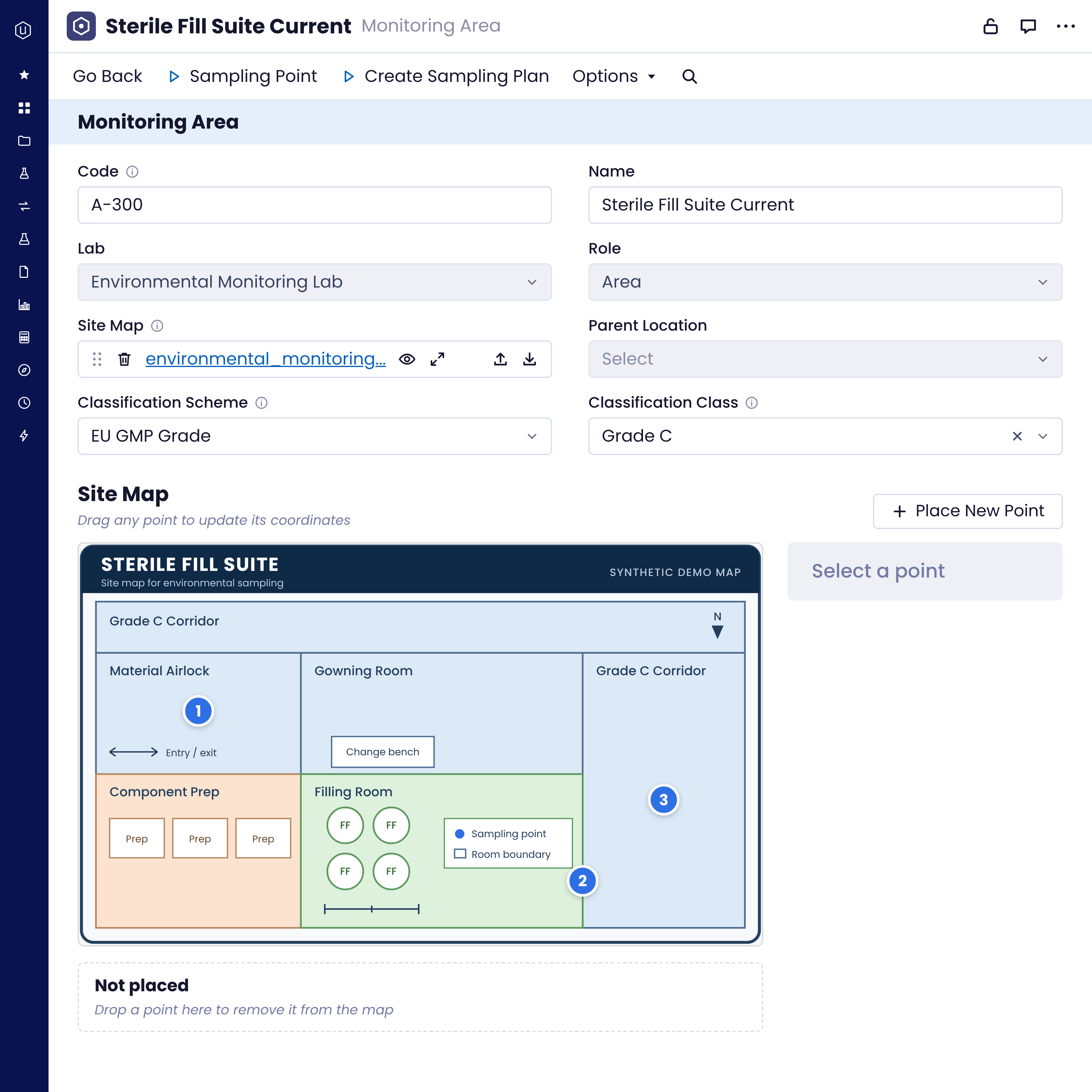
Every point where it physically sits: Sampling points sit on their area's site map with a code and position. Drag a point when a line moves, and the record updates with it.
A schedule nobody rebuilds by hand: Pick points on the map, set a frequency and dates, and the plan calculates the events to create. Each point's sample type defines the lab request it generates.
Results back where they belong: Each point's sample type raises its lab request, so results return to the location they describe.
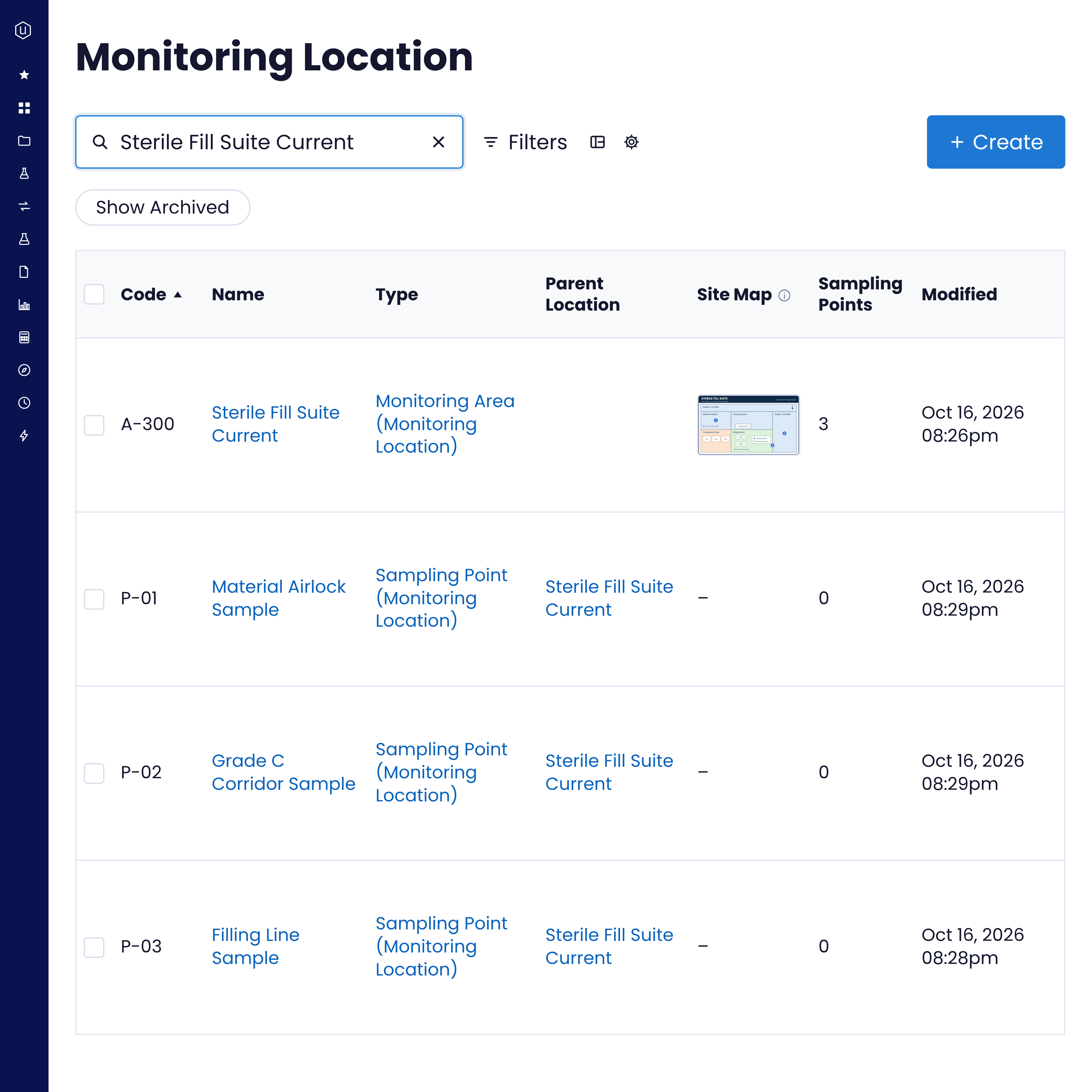
1. Map the area
Create an area for the room or zone, upload its site map and set its EU GMP, food hygiene or ISO 14644-1 classification.
2. Place the points
Use Place New Point to drop sampling points on the map, then set each point's code and sample type in the side panel.
3. Plan the sampling
Create a sampling plan from the area, select the points and set a daily, weekly, monthly or yearly frequency with start and end dates.
4. Capture at the point
Record the result against the point, with photos and files from the floor already attached.
Environmental monitoring sits on the same connected platform as the rest of your lab, configured to your workflows:
Integrated LIMS: Lab requests and results linked to the Sampling Point that generated them.
LIMS for Quality and QMS: Quality records on the same platform when a result needs follow-up.
Bodie: Query areas, points and sampling records, and update approved records under normal access checks.
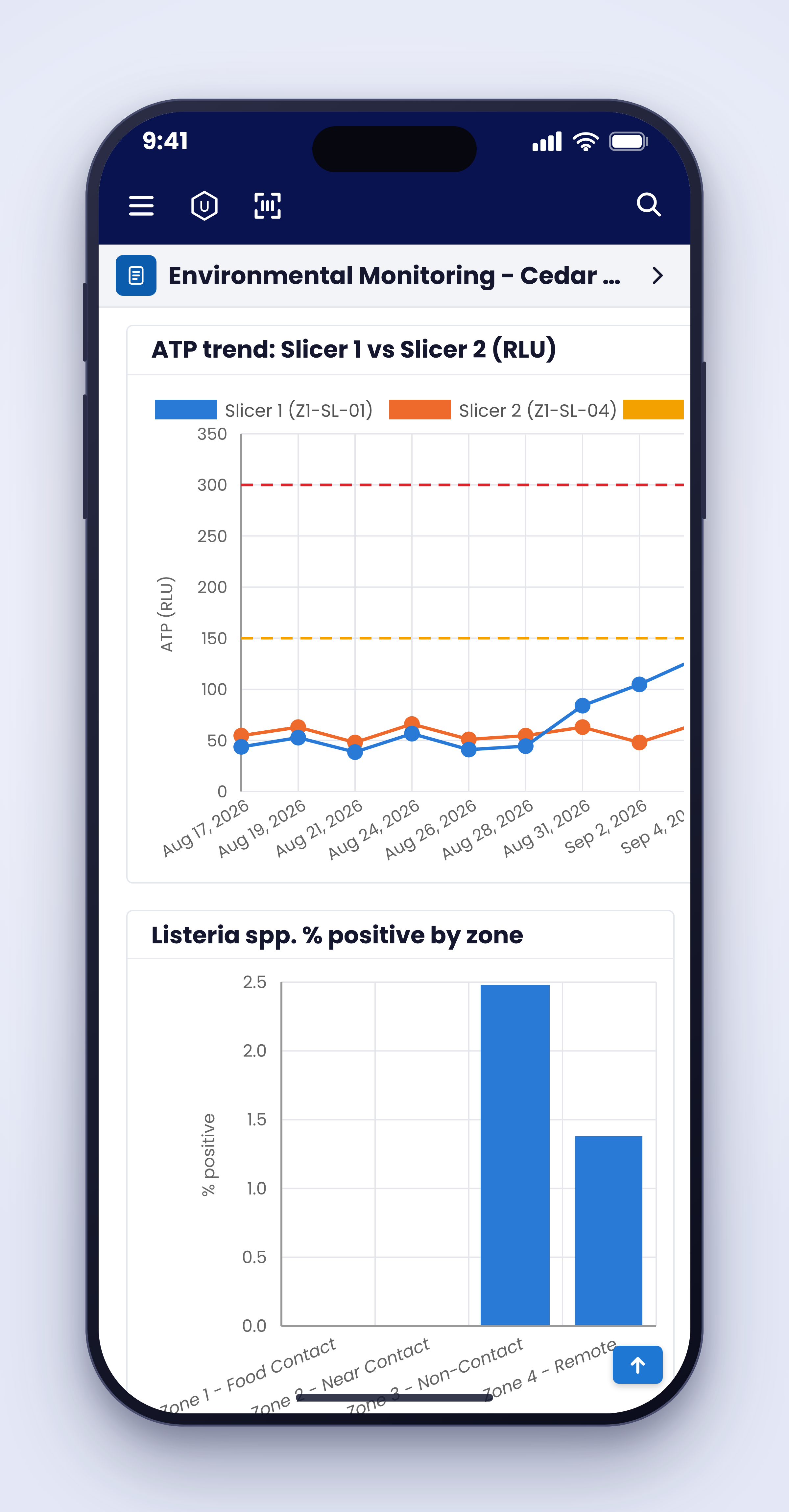
Visualizations and reports: Results compared by point, area and classification.
Integrations: API, SDK and MCP access for external LIMS, telemetry and EHS systems.
We configure your sampling plans around the rooms, classifications and frequencies you already run, and support you from go-live onwards:
Dedicated expertise: A team that knows regulated labs guides the rollout, not just software support.
Light internal lift: Configured to your existing sampling program, rooms and classifications.
Guided, staged implementation: A structured rollout from kickoff and configuration through testing, go-live, and hypercare, led by Uncountable.
Lower total cost of ownership: One platform replaces the floor plan PDF, the schedule spreadsheet and the shared drive of photos.
From site map to lab request
Watch a monitoring program come together end to end. Map a cleanroom area and record its classification, place sampling points on the site map, then build a sampling plan that schedules every event. Each point raises the right lab request, so results come back to the location they describe, and photos taken on the floor attach to the same record. It all runs on the same platform as the rest of your lab.
No camera roll. No inbox. Just the record.
Monitoring happens on the floor, not at a desk. Uncountable puts the record on the phone in the technician’s hand, so photos and files go straight onto the sampling point they describe. Nothing has to be sorted out of a camera roll at the end of the shift.
What this changes on an ordinary shift
The sampling plan set the frequency and dates once and calculated the events to create, so the week starts with the work already scheduled.
Open its area, update the ISO 14644-1 or EU GMP classification and place any new points on the site map.
Drag the point to its new position on the area map and update its details in the side panel. The coordinates update with it.
Ask Bodie. The answer comes from structured records, grouped by area, with links to each one.
Open the sampling point. Its lab requests and results are linked to it, so the trail runs from the location on the map to the result.
Raise the quality record in LIMS for Quality or QMS on the same platform, linked to the swab, instead of starting again in a separate system.
Where it fits
Uncountable runs the sampling program and keeps its data connected to the lab. Emissions accounting, permits and enterprise sustainability reporting stay in the systems built for them, connected through API, SDK and MCP.
Run the sampling program on the same data that runs the lab.
When every sampling point is linked to its area, its plan, its lab request and the evidence captured there, a result is never a dead end. It stays queryable by area, classification and plan, and reusable across R&D workflows, analysis and integrations.
FAQs
Two ways. Take Photo opens the phone's camera, with front or rear selection and zoom, and uploads to the record. Upload from Phone pairs a phone to a record open on a desktop by QR code or a short-lived code, and accepts multiple files up to 100 MB. Both need a file field configured on the record.
No. There is no built-in technician form or offline queue today. Photo capture and phone-to-desktop upload need connectivity and a configured file field on the record.
Each area carries an EU GMP, food hygiene or ISO 14644-1 classification. Sampling points sit beneath the area on its site map.
Not natively today. Areas, points and sampling records are structured and reachable through API, SDK and MCP, so telemetry platforms can be connected through an integration. Time-series dashboards and threshold alerting on sensor feeds sit with that integration.
Usually it sits alongside it. Uncountable owns the sampling program and its connection to lab and R&D data. Emissions accounting, GHG reporting, permits, incidents and CAPA typically stay in your EHS system.
Bring a real floor plan.