Instrument data, structured from the first upload
Uncountable turns the files your instruments export into results and full curves on each experiment, and keeps the raw file with them. Search and compare it across every project, in the same platform as your formulations.
Deployed by 175+ enterprise product development teams







Deployed by Enterprise R&D and Innovation Teams


Instrument data is the hardest lab data to reuse
Every DSC run, rheology sweep, and spectrum lands as a file in a vendor format. A LIMS built for summary results keeps a few numbers and drops the curve. A file archive keeps the raw file but loses the formulation, process, and conditions behind it. So the next scientist runs the test again or rebuilds the spreadsheet.
One upload. Results, curves, and the raw file together.
The difference shows up the next time someone needs the data: whether they can find the run, see what produced it, and compare it with every run before it.
The old way
The Uncountable way
From instrument file to answer
Upload the export on the experiment, or let Uncountable collect it on a schedule. More than 50 built-in parsers read common instrument formats into values and curves on the right experiment.
Parsers for common instruments
Named instrument parsers include TA Instruments DSC and TGA, Waters Alliance HPLC, Instron and MTS, Alpha MDR, and Datacolor. Others cover DMA, NMR, and viscosity.
A configurable parser for everything else
Read CSV and Excel exports from any other instrument with a configurable parser, with no code. For in-house formats, add your own parser.
Scheduled pickup, or send from code
Uncountable collects files from SFTP or S3 on a schedule, and the API and Python SDK send files from any script.
One export, many experiments
A multi-sample export goes to the right experiments by experiment name, ID, or well plate position.
Connected balances
Each reading from a connected balance goes straight to the field you are on, with nothing typed by hand.
Your instruments stay as they are. The files they already export become structured results on the experiment.
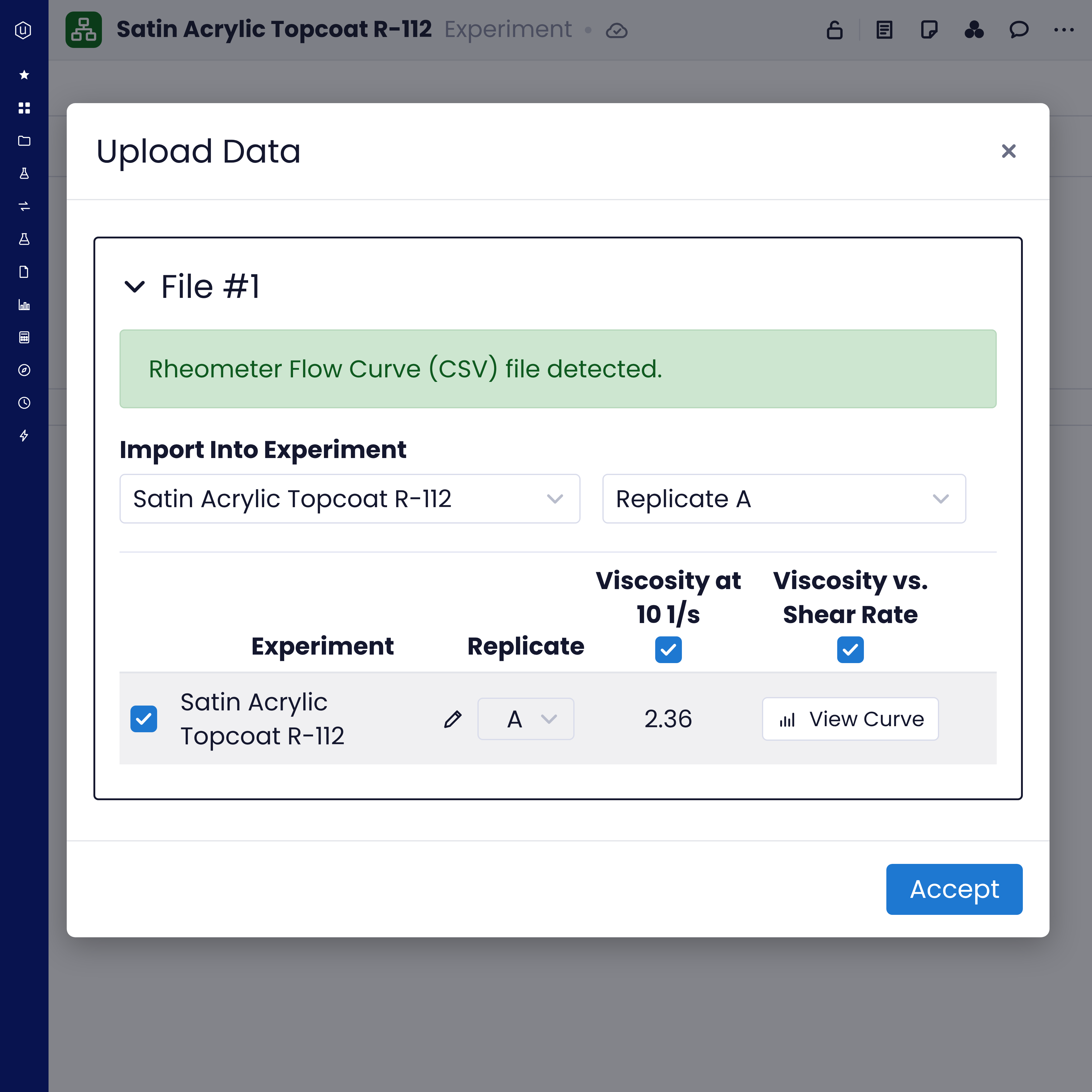
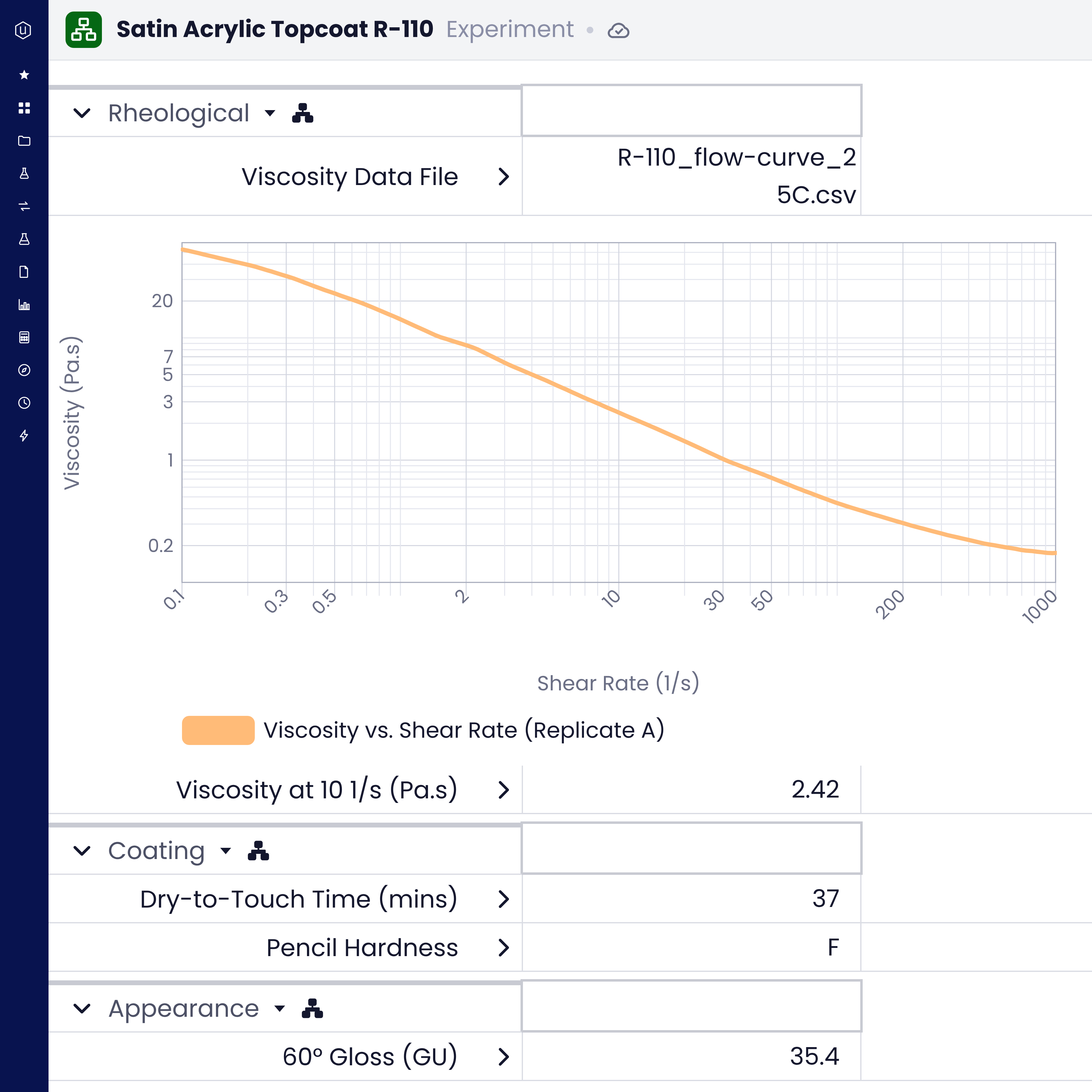
Every upload writes to the experiment it belongs to, so the summary numbers, the full curve, and the file that produced them stay together on one record.
Results on the right experiment
Values land next to the formulation, process, and test conditions they belong to, so a result never appears without the recipe behind it.
Full curves beside the summary numbers
Time-series and 2D curves sit beside the summary values, with peak and region annotations.
The raw file stays attached
Images and the original instrument file stay on the experiment with the parsed results.
Conditions and replicates in the same upload
Test conditions and replicates come in with the values, so nobody re-enters them.
Open the experiment a year from now and the result still carries its curve, its conditions, and the file it came from.
Methods, reports, and instrument files live in one searchable library, so the next scientist finds earlier work before running the test again.
Folders, versions, and previews
Files sit in folders, keep their versions, and open in a preview.
Properties read from the file
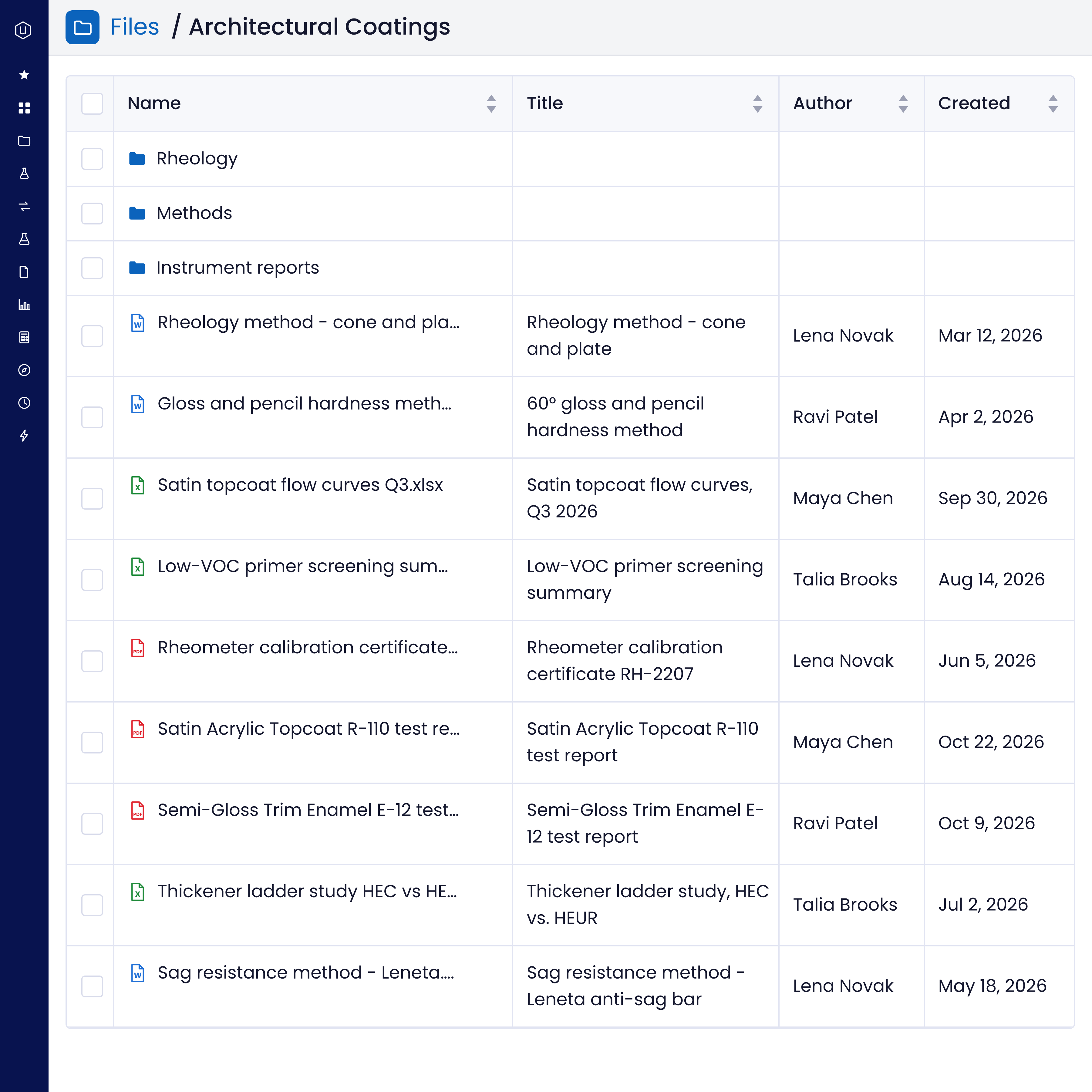
Uncountable reads the title, author, and other properties from Word, Excel, and PDF files, so you can sort and filter the library by them.
Keyword and semantic search
Search across indexed documents by keyword or by meaning, including the text inside screenshots.
Ask Bodie
Bodie, the AI assistant embedded across the platform, finds a method, a report, or a past result when you ask.
A method written three years ago is as easy to find as this morning's run.
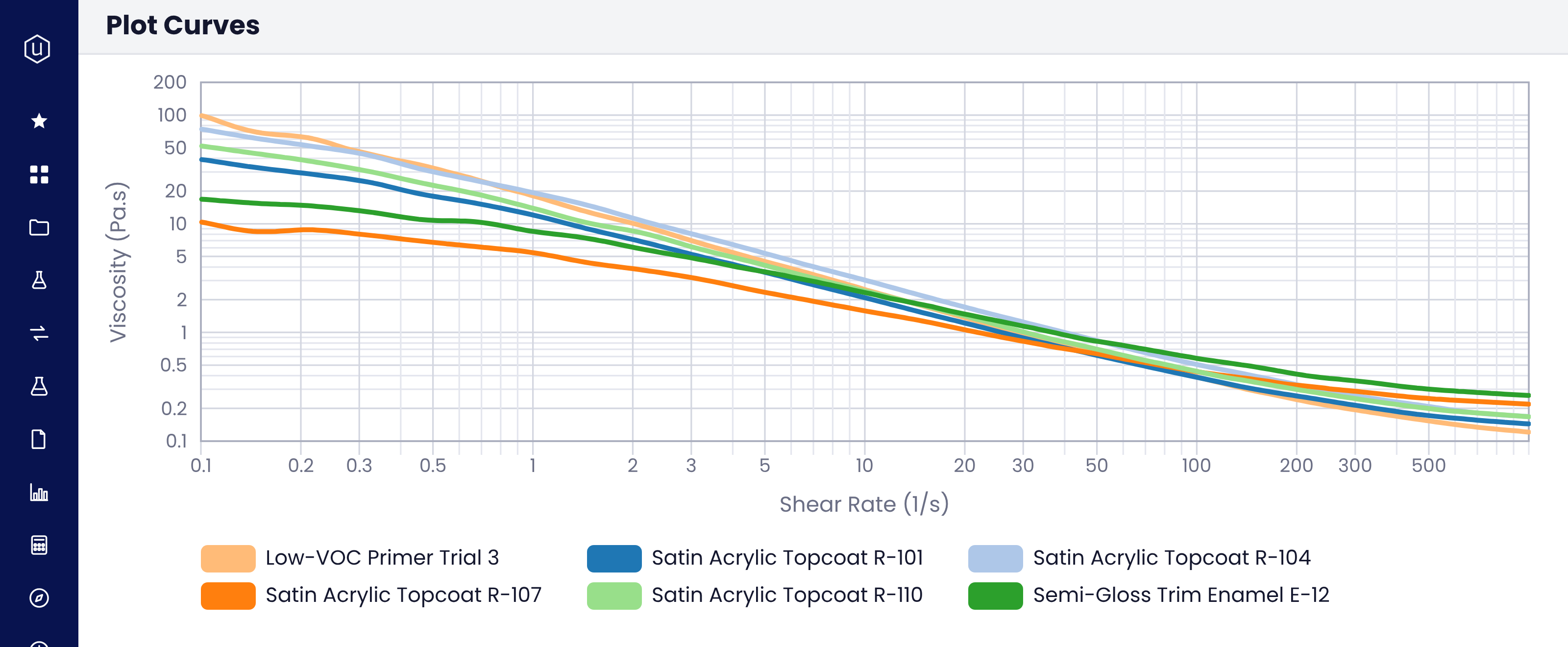
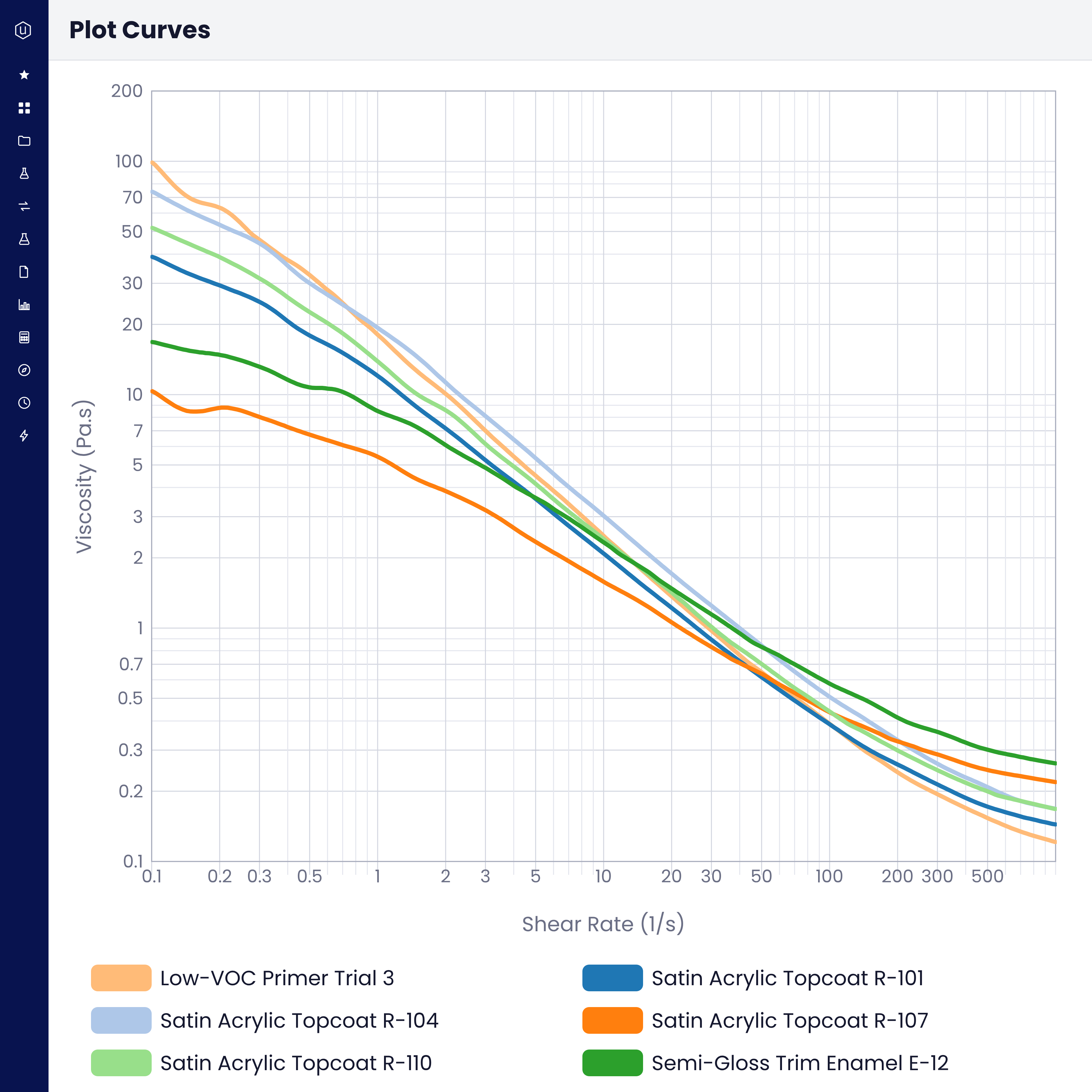
Pick any set of experiments and overlay or average their curves in Curve View, without exporting anything to a spreadsheet first.
Curves keep their context
Every curve keeps the experiment, formulation, and conditions it came from.
Into statistics and models
Take the same data into design of experiments, predictive models, correlation, and ANOVA, straight from the records.
The same data in every downstream tool
The API, Python SDK, and MCP give the same structured data to your data lake, BI tools, and AI models.
A question like which thickener change moved low-shear viscosity gets answered from records the team already has.
What product development teams say

Cabot Corporation
Cabot Corporation, Zhuhai
Scientific data management
inside your R&D platform
A standalone SDMS is one more system to connect to your ELN and LIMS. In Uncountable, instrument data shares one data model with formulations, processes, specs, and projects, so the curve that explains a result sits on the same experiment as the formulation that made it.
Electronic Lab Notebook (ELN)
LIMS for R&D
Inventory Management
DOE & Predictive Tools
Formulation


FAQs
An SDMS captures, organizes, and stores the data that lab instruments produce, so scientists can find and reuse it. Uncountable does this inside the R&D platform. Instrument files become structured results on each experiment, and the raw file stays attached.
An ELN records the experiment, and a LIMS tracks samples and their results. An SDMS manages the raw instrument data behind those results. In Uncountable, all three share one data model, so a curve, the sample it came from, and the experiment that made it stay connected.
More than 50 built-in parsers cover common instruments, and a configurable parser reads any CSV or Excel export. For in-house formats, you can add your own parser.
By upload on the experiment, by scheduled collection from SFTP or S3, or through the API and Python SDK.
Yes. The original file can be attached to each experiment it writes to, next to the parsed results.
See your instrument data in Uncountable