A scientific data management system (SDMS) captures, indexes, stores, and preserves files generated by laboratory instruments and scientific applications. These can include chromatograms, spectra, images, instrument logs, reports, and proprietary data files.
Its purpose is to keep those files retrievable and associated with enough information to understand them. That includes identifying what was tested, when the data was generated, and how it relates to the laboratory’s samples, experiments, and reported results.
Consider a scientist revisiting a purity result from a completed project. The reported value is available, but the original instrument data sits on a workstation under an unfamiliar filename. Finding it requires locating the computer, identifying the run, and checking that the file supports the result in question. An SDMS addresses that retrieval and record-management problem.
How SDMS, LIMS, and ELN differ
The distinction is primarily one of responsibility. An SDMS manages scientific files, a LIMS (laboratory information management system) manages laboratory operations, and an ELN (electronic lab notebook) documents experimental work. Product capabilities overlap, so evaluate what each system actually does rather than relying on its label.
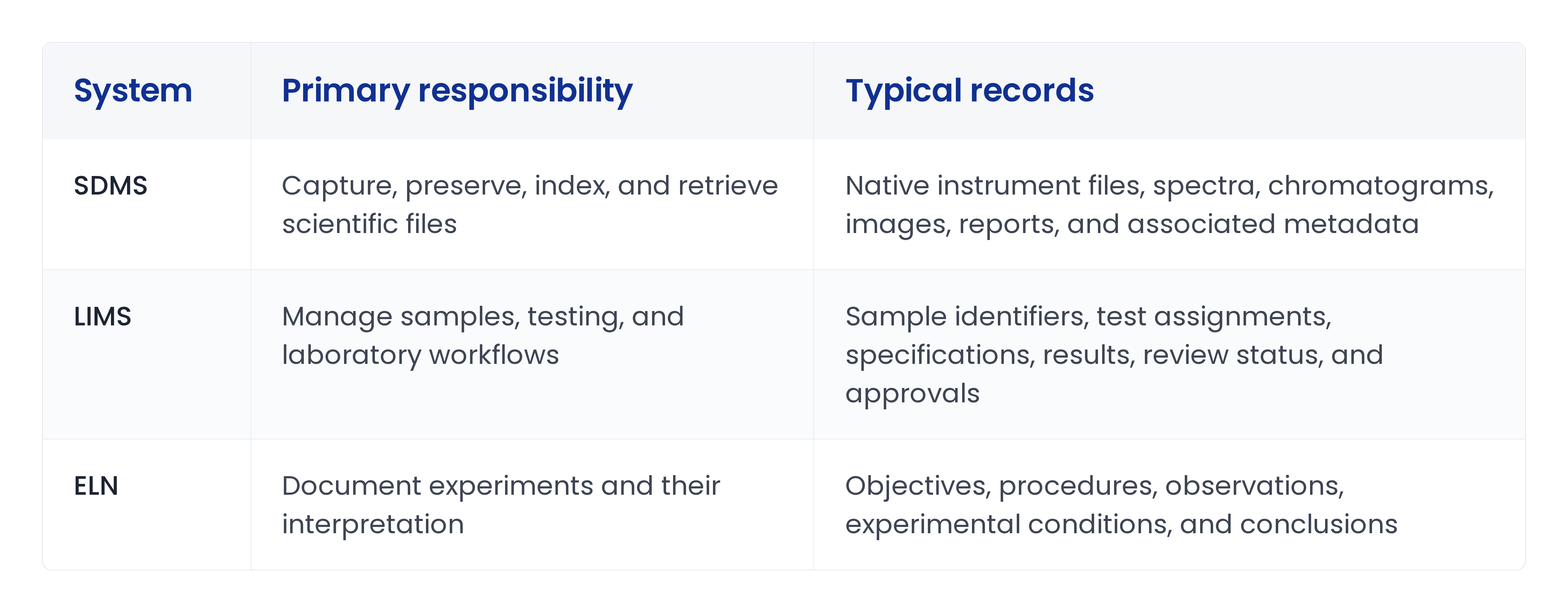
For a chromatography test, the LIMS might record the sample’s reported purity and review status. The SDMS might preserve the native run files and associated reports. The ELN might explain the experiment, sample preparation, and interpretation. We cover the overlap in more detail in LIMS vs SDMS.
These roles can exist in separate applications or within a broader platform. A LIMS or ELN may also offer substantial file-management functionality. The question is whether those capabilities meet the laboratory’s requirements for file volume, format support, search, retention, and access, not whether the system allows attachments.
When systems are separate, users need dependable links between them. A reviewer should be able to move from a reported result to its supporting files without reconstructing the relationship manually.
SDMS capabilities to evaluate
Capture and native-file retention
An SDMS should provide a reliable way to collect files from the instruments and applications in scope. Establish which locations it monitors, which file types it accepts, and whether capture requires user intervention.
Retaining a PDF report is not always equivalent to retaining the source data. Native files may contain acquisition parameters, processing settings, or other information absent from the report.
Also distinguish preservation from usability. Storing a proprietary file does not necessarily mean the SDMS can open, interpret, or reprocess it. Check whether future review requires the original instrument software and how access to that software will be maintained.
Metadata and search
Metadata describes a file and its context. Useful fields may include sample identifier, project, material, instrument, method, analyst, acquisition date, and file type.
Agree on where each field comes from. Some metadata can be extracted from files; other fields may need to come from a LIMS, ELN, or controlled user entry. Inconsistent identifiers can leave files correctly stored but incorrectly associated. The same issue applies to chromatography data systems that hold their own run metadata.
Test search against real questions. Can a user retrieve the source files behind a particular result? Find previous runs for a material? Locate data generated using a specific method? Those tasks reveal more than a demonstration using filenames alone.
Connections to laboratory records
An SDMS should preserve the relationship between its files and the systems where laboratory work is managed.
For R&D, that may mean connecting files to samples, formulations, experiments, and measured properties. For QC, it may mean linking them to batches, specifications, test records, and review decisions.
Determine which system owns each identifier and how links remain valid when records are updated or systems are migrated. The objective is not simply to exchange files; it is to maintain a usable path from a result back to its evidence.
Record protection and history
Evaluate how the system protects source files, controls access, and records relevant actions. The original output should remain identifiable when users create derived reports, revise interpretations, or repeat an analysis.
Ask how the system distinguishes those activities. A replacement file should not obscure the earlier record, and a new report should not be mistaken for the original instrument output.
For regulated workflows, assess the controls against the records and activities in scope. An SDMS can support compliance, but compliance also depends on configuration, validation where required, procedures, training, and consistent use. Buying the software does not establish compliance on its own.
Retention, recovery, and export
Scientific files may need to remain available long after a project ends or an instrument is replaced. Evaluate retention policies, backup and recovery, archival access, and migration options.
Include metadata and relationships in that review. Exporting files without their identifiers, history, or connections can make them difficult to interpret outside the original system.
Ask the vendor to demonstrate retrieval from an archive and explain what happens when instrument software, storage infrastructure, or the SDMS itself changes.
Does your laboratory need an SDMS?
A dedicated SDMS is worth considering when existing systems cannot reliably preserve and retrieve scientific files at the required scale.
Common warning signs include results whose supporting data cannot be found, manual file transfers between several locations, inconsistent naming across sites, and investigations that require extensive searches through local computers and shared drives.
Before adding another application, review the capabilities already available in your instrument software, LIMS, ELN, and existing repositories. The gap may require a dedicated SDMS, better integration, or clearer ownership and procedures.
Test a complete SDMS record lifecycle
Use a representative workflow during evaluation: capture an instrument run, associate it with the correct sample, retrieve it from a reported result, create a derived report, and recover or export the record.
Include exceptions. What happens when the sample identifier is missing? When capture is interrupted? When a file arrives twice? When a user lacks permission to access it?
A useful evaluation should answer five questions:
- Can the required source files be captured without routine manual handling?
- Can users find them through laboratory identifiers and metadata?
- Can users distinguish original data from later reports or interpretations?
- Can files remain accessible throughout their retention period?
- Can files and their context be retrieved during recovery or migration?
Keep SDMS and instrument connectivity distinct
SDMS and instrument connectivity solve different problems. Instrument connectivity concerns how data leaves an instrument and reaches another system. SDMS concerns how scientific files are preserved, governed, and retrieved afterward.
Both matter. A successful transfer does not establish long-term retention. A well-managed repository does not necessarily make measured values available for comparison across experiments.
For connected R&D workflows, preserve the supporting files while maintaining structured records for formulations, materials, experiments, and results. That gives users both the values needed for analysis and the evidence needed for review.
Uncountable connects formulation, material, experiment, and result records with their supporting files and source data. See how scientific data management works in Uncountable, or book a demo to discuss how those records would fit with your existing instrument systems and repositories.