Most labs connect QC results to formulation and batch data after something goes wrong. A result fails, someone exports the LIMS results, the ERP batch report and R&D's formulation sheet, and matches them on batch number. That join is where the investigation stalls, while the batch sits on hold and a customer waits for an answer. The links have to be made when the result is entered: sample to batch, batch to the formulation revision and the raw-material lots actually used, and result to the spec it was checked against. Make them then, and an out-of-spec result already carries what you need to explain it.
Why matching on batch number afterwards rarely works
On paper, every system shares a key. The ERP has the batch number, the LIMS has it on the sample, and the formulation sheet has a product code. In practice the keys drift. A technician logs the sample against the work order. The ERP records that resin was issued, but not which of two lots went into the tank. The formulation sheet shows today's revision, not the one in force on the day the batch was made. Each gap is small. Together they mean someone rebuilds the history by hand before the real question, why the batch failed, can even be asked.
Retests make it worse. Where results live in an ERP quality module or a spreadsheet, a passing retest often replaces the failed value. The record says the batch passed, and the history that would have shown a pattern across three lots of the same resin is gone.
What a QC result needs linked at entry
For a result to explain itself, five links have to exist when it is recorded:
- the sample to the batch it represents
- the batch to the formulation revision it was made to
- the batch to the raw-material lots actually charged
- the result to the specification, and spec version, it was checked against
- every retest to the original result, with both kept
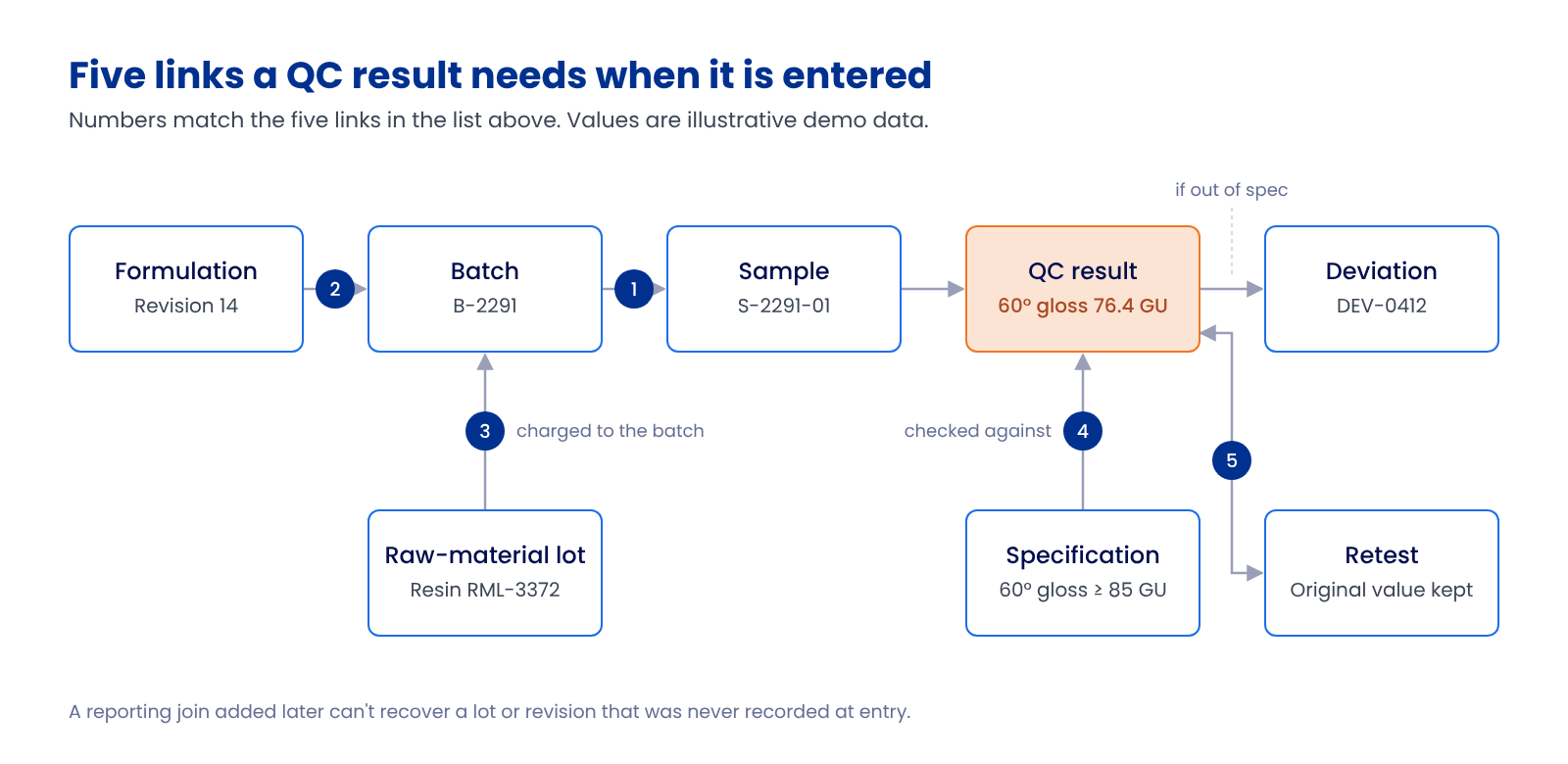
A better reporting join can't add a lot number or a revision that was never recorded. That's why the fix belongs at result capture.
Worked example: low gloss on a waterborne topcoat
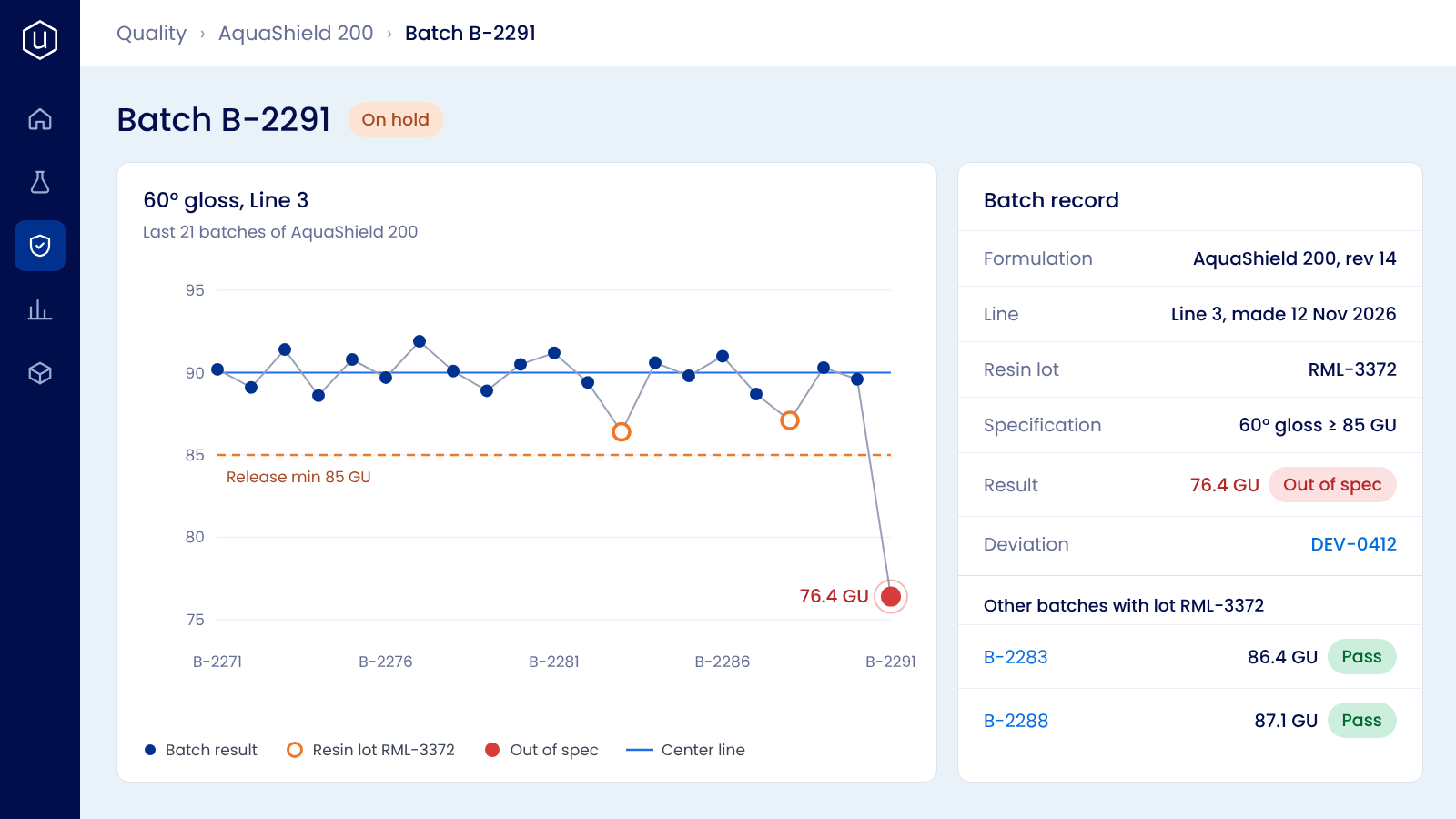
Illustrative demo data. Batch B-2291 of a waterborne topcoat reads 76.4 GU at 60° against a release minimum of 85 GU. The previous 20 batches ran between 88 and 92 GU.
If the result sits on its own, the questions go out by email. Which formulation revision was this? Which resin lot went in? Has anything else been made with that lot? The batch stays on hold while the answers come back from three teams.
If the links were made at entry, the record already shows revision 14 and resin lot RML-3372. Two earlier batches made with RML-3372 passed, but at 86 and 87 GU, at the bottom of the range. That points at the lot rather than the process. The remaining drums of RML-3372 go on hold, and the supplier gets a complaint with the data attached before a third batch ships just above the limit.
Connect what you have, or move capture to one record?
Integrating existing systems on shared IDs works when the IDs are clean and you mainly need the links for reporting. It struggles with the gaps above: lots that were never captured, revisions that were overwritten, retests that replaced results. If those are your gaps, change how results are captured. Many labs do this in stages, keeping the ERP for stock and batch execution and moving sample, spec and result capture first, one site at a time.
How Uncountable records the links at entry
In Uncountable, LIMS for quality and R&D's formulation records share one data model. A QC sample is tested against the formulation revision R&D released and the lots recorded for that batch, with nothing retyped between teams. Results are checked against the assigned spec when they're submitted or an instrument file is uploaded, and a configured workflow can open a deviation linked to the batch, with its files attached. Retests are kept beside the original value, and control limits are set per product line, so a drift shows against that line's own history on the SPC chart. Deviations and CAPAs carry on in QMS with the same records.
The LIMS for Quality solution brief walks through the same out-of-spec-to-release flow. If you have a recent batch you had to trace by hand, book a demo and we'll show what that trace looks like when the links already exist.