Fewer runs. Faster to target.
Uncountable's Design of Experiments (DOE) and predictive tools design the most impactful experiments, model your properties, and point to the next best run to try, all on the structured formulation and test data you already have. Structure first, AI second.
Deployed by 175+ enterprise product development teams







Deployed by Enterprise R&D and Innovation Teams



One variable at a time burns months you don't have
Most DOE programs still move one variable at a time, or lean on a DOE built in a separate statistics package and hand-copied back into a spreadsheet. The design ignores what past projects already proved, the results land far from the recipe that produced them, and the models that could predict the next result cannot run on data stitched together with lookups. Uncountable designs the experiment on your structured history, keeps every result linked to its formulation and process, and turns that connected record into predictive models and a shortlist of what to run next.
DOE and predictive models, from design to insight
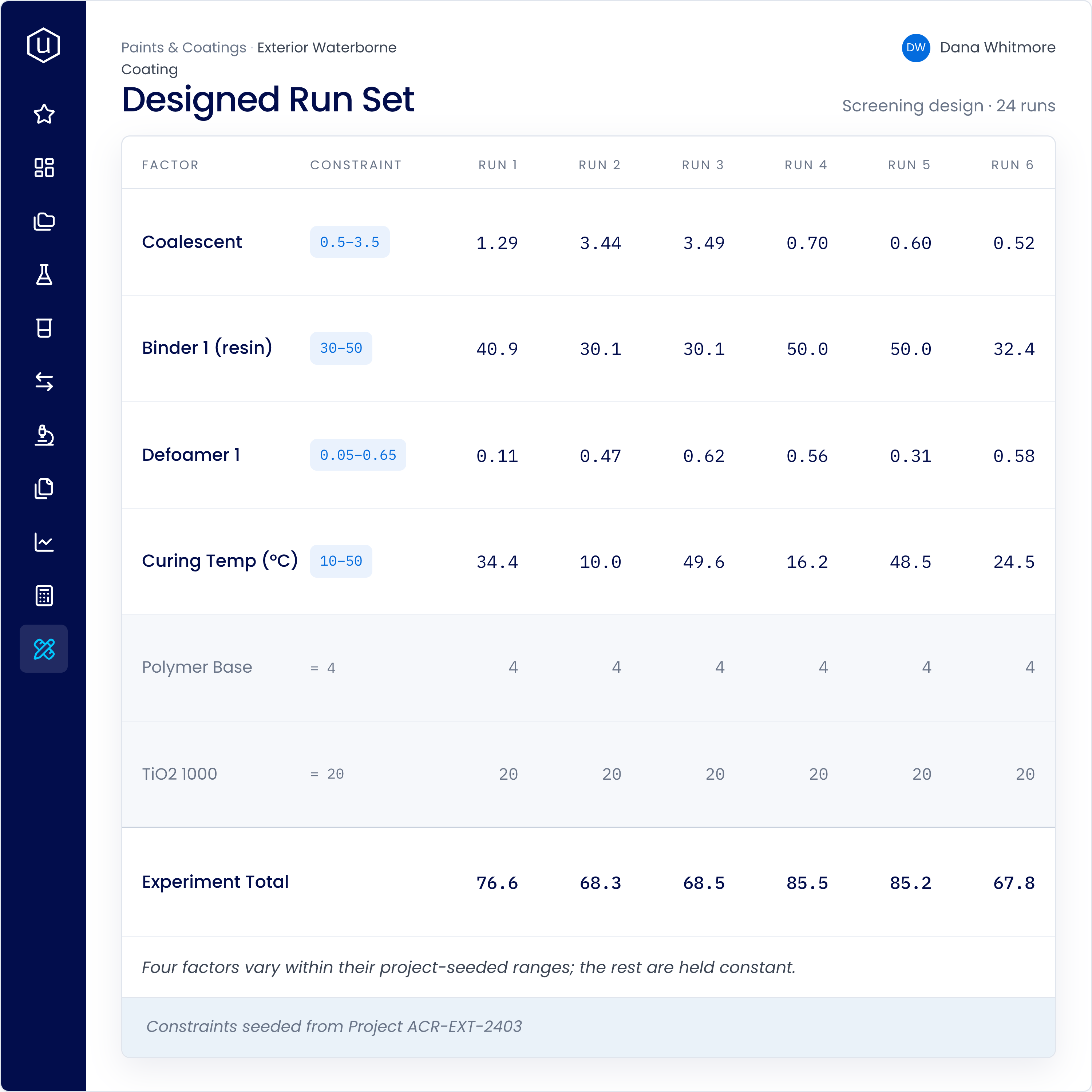
Design the experiments that cover more ground in fewer runs.
Setup, not transcription: Your ingredients and process parameters are already in the platform. Pick what you want to study and the design comes back ready to run: no re-entering a recipe into a separate tool.
Sensible ranges to start from: The platform proposes a range for each factor based on past data. Widen them to push into new territory, tighten them to stay close to home. The design covers whatever space you give it.
Formulations you can actually make: Set your ingredient ranges and formulation total, and every run in the design is built inside those limits.
One place, start to finish: The design lands in the project as real experiments, ready to run and record results.
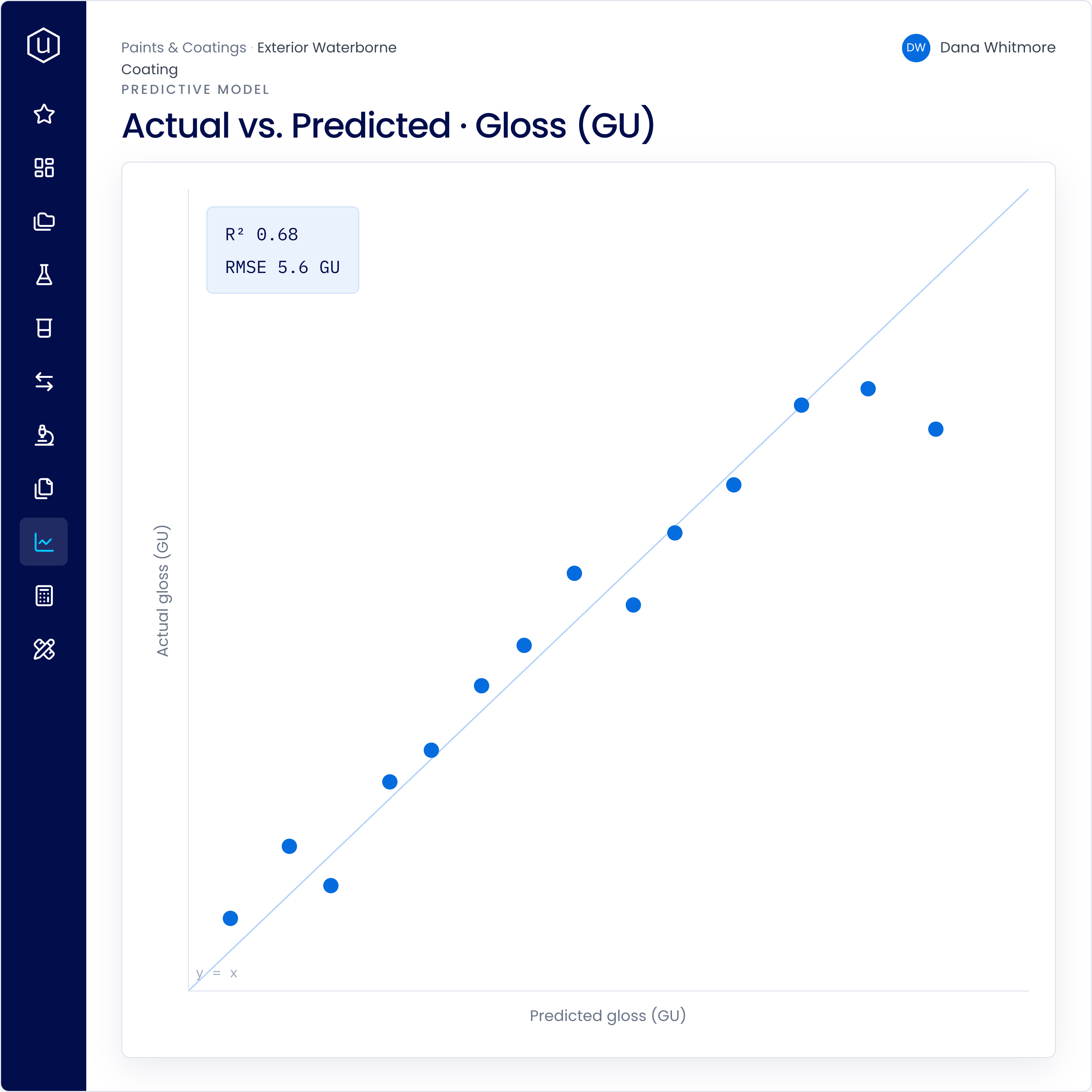
Model your properties from structured history, so you can screen candidates before the bench.
Predict properties from formulation and process: Models learn from your past results to estimate outcomes like gloss, viscosity, or tensile strength for a proposed recipe.
Read why, not just what: Feature importance shows which ingredients and conditions drive a property, so a scientist can interpret the model.
Gets sharper as data grows: Every new experiment, including the failures, feeds the model, so it improves as your data grows.
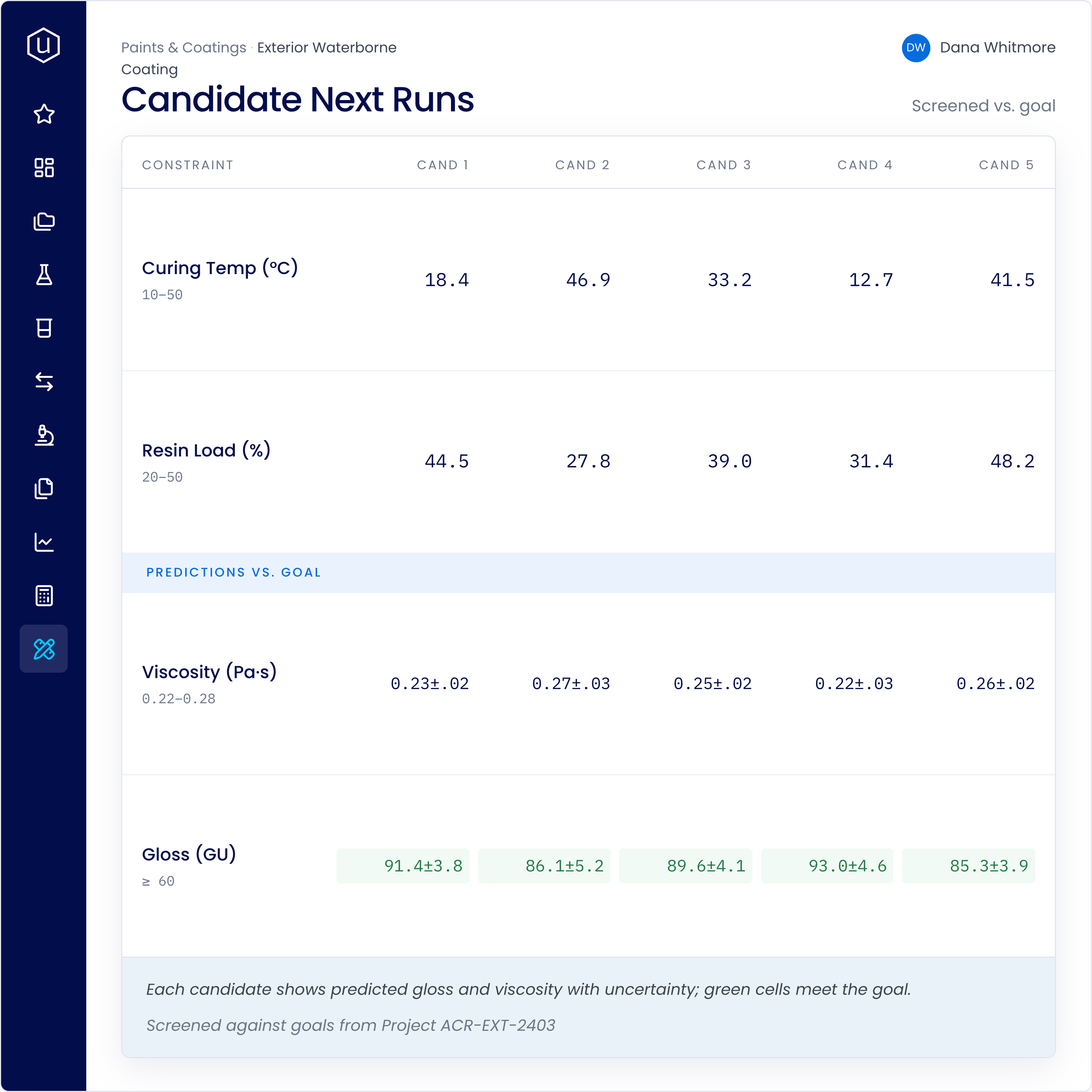
Let the data point to the runs that will teach you the most next.
Suggested next experiments: The tools surface a shortlist of candidate runs with predicted results and uncertainty, screened against your goal.
Explore where you know less: Suggestions include under-sampled regions of the design space, not just small steps around what you already know.
Stronger as the record deepens: Recommendations improve as more results are recorded, so the platform gets more useful with every project.
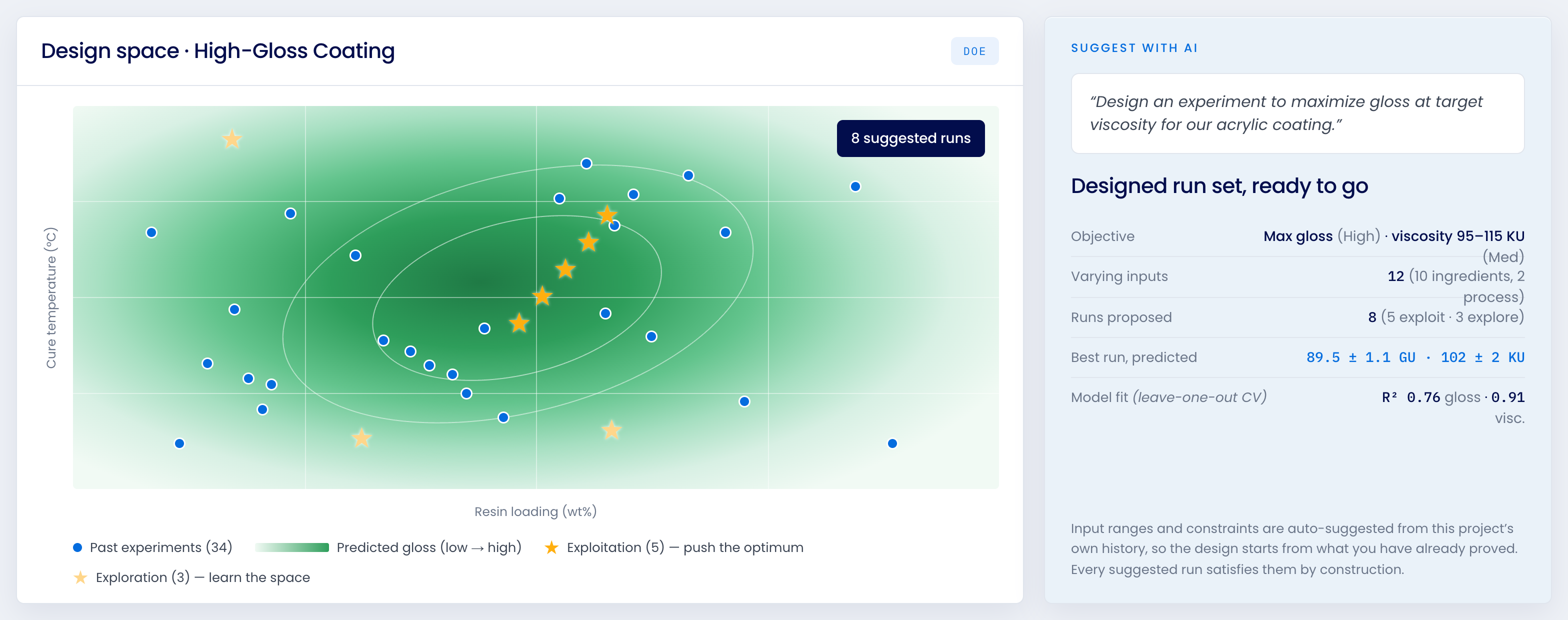
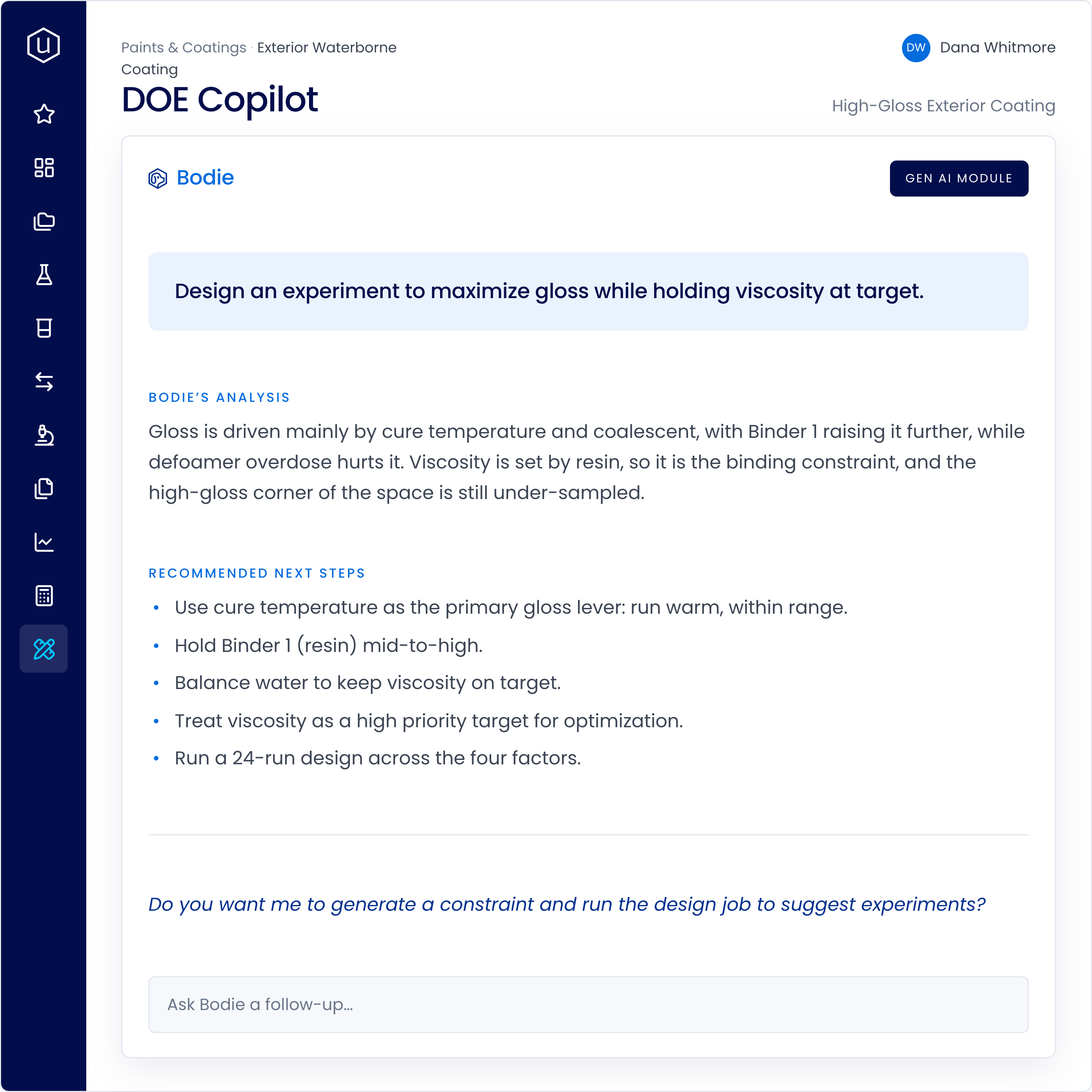
Set up a designed experiment in plain language, with Bodie grounded in your project data.
Describe the goal, get a design: Tell Bodie the formulation and the targets, and it proposes a designed run set with constraints pulled from the project history.
Explains the model in plain language: Bodie walks through what the design covers and what the model is saying, so the science stays with the scientist.
Hours, not days: Setup that used to mean a separate stats package and manual copying happens in the flow of the work.
Bodie is available with the Gen AI module. Talk to your Account Manager if interested.
Build chemistry-informed models
A model can see more than just your formulation as a list of ingredients and amounts. You can bring in the chemistry behind them.
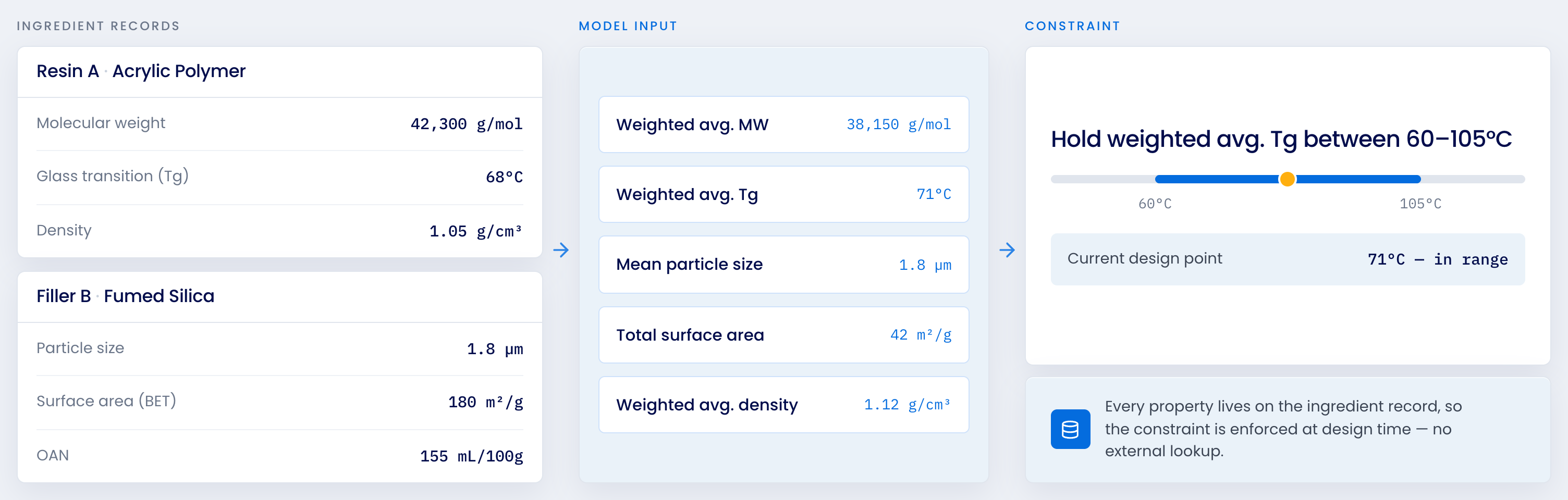
Molecular weight, glass transition temperature, density, particle size, surface area, etc, whatever properties matter for your chemistry sit on the ingredient record. Record them once and they’re available across the platform.
Define an input calculation once and it can be leveraged by the model: weighted average molecular weight across a resin blend, weighted average Tg, mean particle size across a filler package. The model stops seeing which acrylic you used and starts seeing what that acrylic brings.
Two formulations with different resins but similar molecular weight look similar to the model, because they are. It learns relationships that carry across blends, not just across the specific materials in your history.
These features behave like any other input, so you can constrain them. Hold weighted average Tg between 60 and 105°C, keep molecular weight in a workable window, and suggestions stay inside the chemistry you’re willing to run.
Guessing versus designing
Without Uncountable
With Uncountable
What our customers say
Lab Manager, Future Lab Applied Digitalization




.png)
Every experiment makes the next one smarter.
A designed run set learns from your history, a predictive model learns from every result, and the next suggestion learns from both. When the data is structured and connected, each experiment compounds instead of starting over. Structure first, AI second.
FAQs
Uncountable's DOE and predictive tools are the design-of-experiments and machine-learning capabilities built into the platform. They design efficient experiments, model properties from your structured formulation and test data, and suggest the most informative runs to try next, all connected to the record that produced each result.
Traditional DOE tools design experiments in a separate statistics package, disconnected from your formulation history and results. Uncountable designs on your structured data in the platform, seeds constraints from past projects, and keeps every result linked to the recipe and process that produced it, so the design, the models, and the next-run suggestions all draw on the same connected record.
No. The models augment scientists, they do not replace them. Feature importance and plain-language explanations show which ingredients and conditions drive a property, so a scientist interprets and directs the work while the tools handle the heavy computation.
Predictive models and next-experiment suggestions get sharper as your structured record grows, because every result, including failures, feeds them. The right starting point depends on the number of factors and the property being modeled, which your Uncountable team scopes with you during setup.
The DOE Copilot is part of Bodie, Uncountable's AI assistant. You describe the formulation and targets in plain language, and it proposes a designed run set with constraints from the project history, explains the model, and sets up the workflow. Bodie is available with the Gen AI module.